




Payroll Accuracy Starts with Employee Data Accuracy
Payroll Accuracy Starts with Employee Data Accuracy
Payroll is one of the most sensitive processes in any organisation.
Employees expect to be paid accurately and on time. They expect deductions to be correct. They expect changes to their role, working pattern, bank details, address or cost allocation to be reflected properly. When something goes wrong, the impact is immediate and personal.
But payroll errors do not always start in the payroll team.
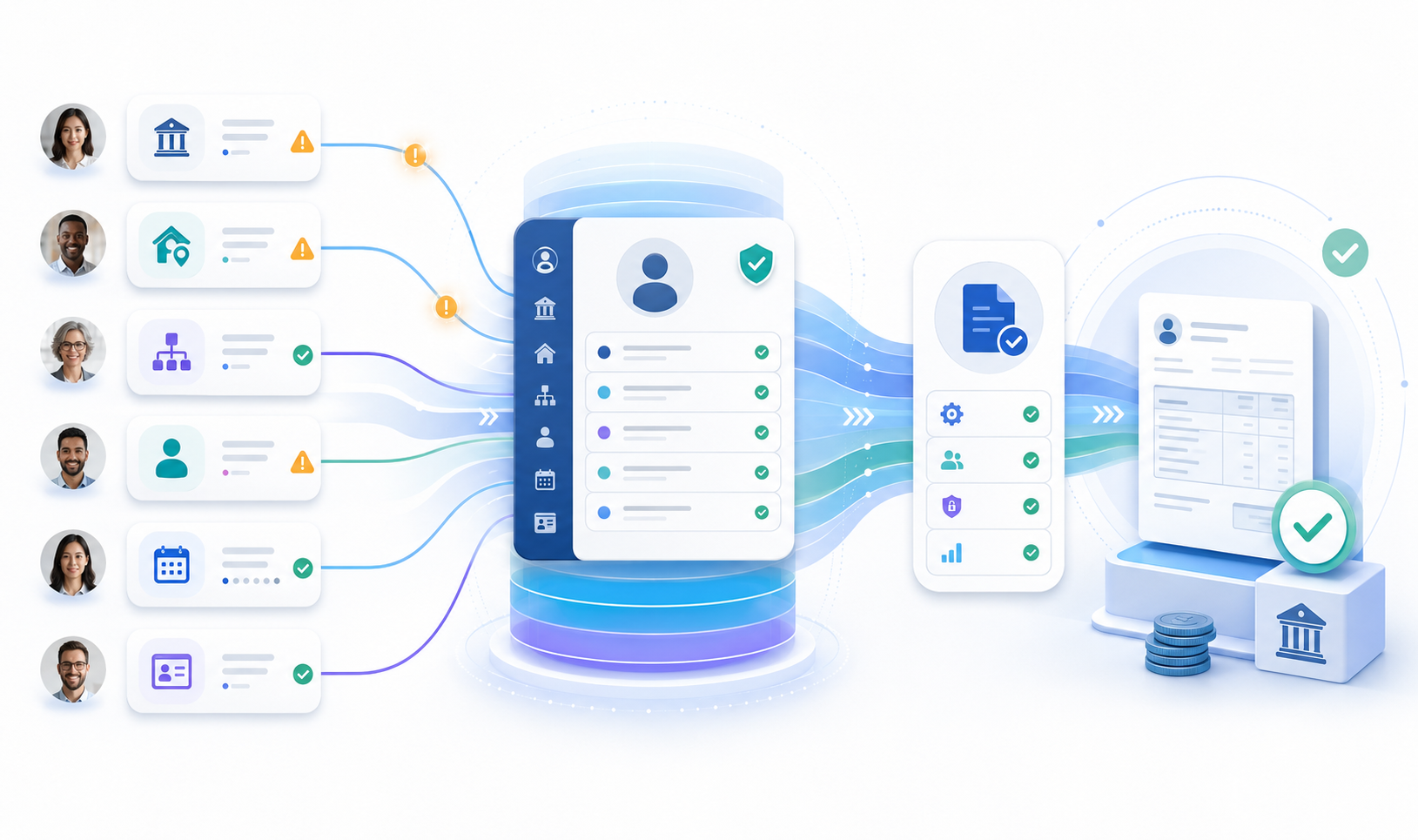
Many payroll problems begin earlier, with employee data that is incomplete, out of date or waiting for confirmation. A bank account has changed but not been updated. An address is no longer correct. A manager has not confirmed a change in working hours. A cost centre assignment has not been reviewed. An employee record still reflects an old role, location or organisational position. A field that matters to payroll, finance, compliance or reporting has not been checked for months.
The payroll process may be well controlled. The system may be configured correctly. The payroll team may be experienced and diligent.
But if the underlying employee data is wrong, payroll accuracy becomes harder to achieve.
That is why employee data accuracy should not be treated as a low-level HR administration issue. It is part of the operational foundation on which payroll, reporting, compliance and employee experience all depend.
Payroll errors often start upstream
Payroll is usually judged at the point of output.
Was the employee paid correctly? Was the payment made on time? Were the correct deductions applied? Was the payslip accurate? Were the right postings made to finance? Did the organisation avoid queries, corrections and rework?
Those questions matter, but they do not always reveal where the problem started.
A payroll issue may be triggered by a late or incorrect change to employee master data. A new bank account may not have been validated in time. A change in contracted hours may be waiting for manager confirmation. A working location may have changed without the relevant record being updated. An employee may have moved to a different department, but the cost allocation has not been reviewed. A leaver, returner, secondment or internal move may have introduced a data dependency that payroll only discovers later.
By the time the issue reaches payroll, the team may be forced into correction mode.
They need to investigate the cause, contact HR, chase a manager, ask the employee to confirm details, make an adjustment, explain the issue and potentially handle a follow-up query. In some cases, the correction may need to wait until the next payroll run. In others, it may require an off-cycle payment or manual intervention.
None of this is efficient.
It also puts unnecessary pressure on payroll teams, who are often already working to strict deadlines and fixed processing windows.
The better approach is to deal with employee data accuracy before it becomes a payroll problem.
Why employee data becomes stale
Employee data changes constantly.
People move house. They change bank accounts. They take on new roles. They move between departments. Their manager changes. Their working pattern changes. They join new cost centres or projects. Their employment status may change. They may need to confirm personal details, emergency contact information or other important HR data.
Some changes are part of formal HR processes and are captured at the time. Others are more informal. The employee knows something has changed, but does not immediately update the system. The manager is aware of the change, but assumes HR has already been told. HR may have the right process in place, but the required confirmation sits in an email inbox. Payroll may only discover the issue when the data is needed.
This is not usually a technology failure. It is a participation problem.
The people who know the data best are often not the people responsible for maintaining the system. Employees know whether their personal details are correct. Managers know whether team structures, cost allocations and working arrangements still reflect reality. HR and payroll teams can coordinate the process, but they cannot confirm every detail on behalf of the business.
That creates a familiar gap. The system holds the record. HR owns the process. Payroll depends on the outcome. But the information itself often needs to be confirmed by employees and managers who are busy with other work.
If those people do not respond, the data becomes stale.
Why periodic data checks are not enough
Many organisations try to improve employee data accuracy through periodic checks.
These may take the form of employee record updates, open enrolment confirmations, year-end payroll checks, manager spreadsheet reviews, targeted HR data cleanse exercises or internal campaigns asking employees to confirm key personal details.
The intention is sensible. Give employees and managers an opportunity to confirm that important information is still correct. Identify errors before they cause operational issues. Reduce the risk of payroll corrections, reporting problems or employee queries later.
The problem is that these exercises are often difficult to complete effectively. Email campaigns are easy to miss. Spreadsheet-based reviews create version control issues. Managers may be asked to validate too much information at once. Employees may postpone the task because it does not feel urgent. HR teams may need to send repeated reminders. Payroll teams may still find that critical details have not been confirmed by the time they are needed.
There is also a timing issue. Periodic validation can help, but employee data does not only change at convenient review points. A bank detail change, address update, cost centre move or manager change may become important long before the next scheduled check. If the organisation waits for a periodic campaign, the data may already have caused issues.
Large validation exercises can also create a heavy administrative burden. HR may need to identify the target population, prepare extracts, send communications, track responses, chase non-responders, reconcile updates and manually check whether changes have been made in the system. Managers may receive a broad request that includes information they do not need to review. Employees may be asked to confirm details that have not changed.
The result is often a process that creates activity, but not necessarily confidence.
A better model is more targeted, more timely and easier for the user to complete.
Using Teams to prompt timely employee and manager action
Employee data accuracy improves when the right person is prompted at the right time, with the right context.
That might mean asking an employee to confirm their bank details before a payroll cut-off. It might mean asking a manager to confirm a cost centre allocation when an employee changes role. It might mean prompting an employee to review their personal details after a long period without updates. It might mean asking a manager to validate team information ahead of a payroll, HR or finance reporting process.
The important point is that the request should be easy to understand and easy to complete.
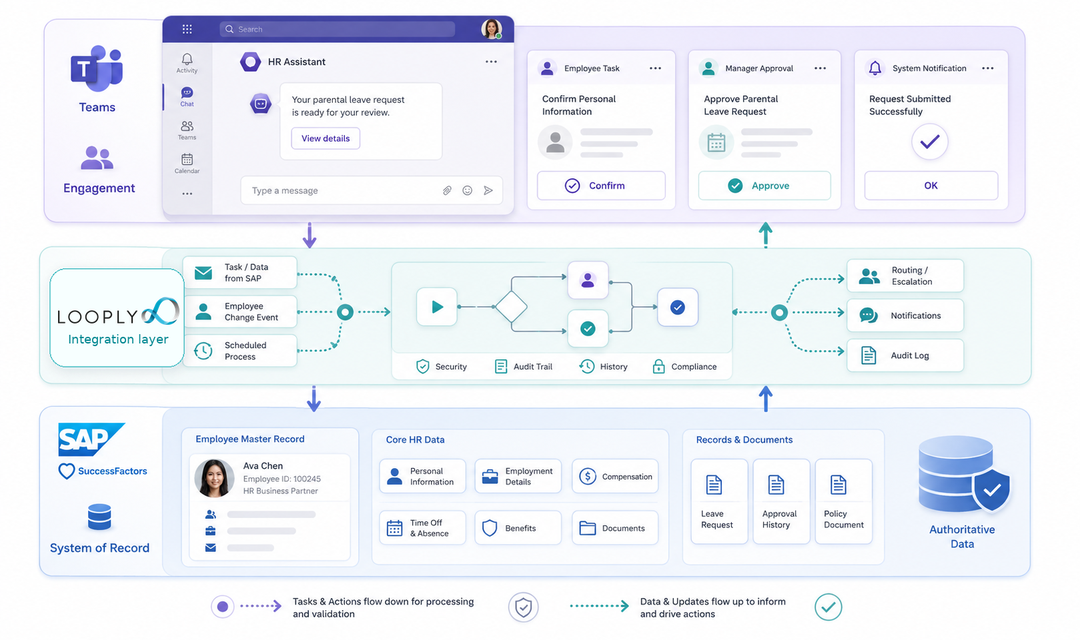
This is where Microsoft Teams can play an important role. Many employees and managers already spend much of their working day in Teams. It is where they receive messages, attend meetings, collaborate with colleagues and respond to day-to-day requests. If an employee data validation task arrives there, it is more visible than another internal email and more convenient than a separate system login.
Using Looply, organisations can send targeted employee data tasks into Teams as Adaptive Cards.
For an employee, the card might show the data that needs to be confirmed and provide a simple way to respond. For a manager, it might show the employee, the field that requires validation, the current value, the proposed value and the action required. The user can then confirm, reject, comment or provide additional information from Teams.
This does not mean every HR or payroll process should be recreated inside Teams.
The goal is more focused than that. Teams should be used where business participation is needed and where the user experience would otherwise create friction. A manager does not need to navigate through a full HR master data record just to confirm that an employee now belongs to a different cost centre. An employee should not need to search for the right portal page just to confirm whether a bank account, address or emergency contact is still correct.
The task should come to them with the necessary context. That is how a controlled process becomes easier to complete.
Not every task is an approval
It is useful to think beyond traditional approvals.
Some employee data tasks require a formal decision. A manager may need to approve a change to working hours, confirm a cost allocation or validate an organisational assignment. In those cases, the Teams card can present the relevant information and capture the manager’s approval.
Other tasks are not approvals at all. They are confirmations, validations or data enrichment steps.
An employee may simply need to confirm that their address is still correct. A manager may need to confirm that a team list is accurate. An HR administrator may need a missing value from an employee. A payroll specialist may need a manager to clarify whether a change should apply from a particular date.
These small tasks matter. They are often the tasks that delay the process, create uncertainty or lead to payroll corrections later. They may not feel important to the person receiving them, but they are important to the process as a whole.
That is why presentation matters. A good Teams-based data validation task should make the requested action clear. It should show why the user is being asked. It should include only the information needed for that decision or confirmation. It should avoid overloading the user with unnecessary fields. It should make the controlled route the simplest route.
When users can respond quickly and confidently, HR and payroll teams spend less time chasing and more time managing the process.
What this can look like in practice
A simple employee data accuracy process might begin with a targeted prompt.
An employee receives a Teams notification asking them to confirm or update selected personal details. The card shows the information that needs attention and provides a clear action. If the employee confirms that the data is correct, the response is recorded. If they identify a change, the process can collect the updated information or route the request for review.
Where manager confirmation is needed, the manager receives a separate task with the relevant context. That might include the employee name, the current value, the proposed change, the effective date and any comments from the employee or HR team. The manager can then approve, reject or request clarification.
The process can then update the relevant system or trigger the appropriate follow-on action.
This is a practical way to turn employee data maintenance from a broad administrative campaign into a focused workflow. The employee or manager is not being asked to search for the right system, interpret a long email or respond to a spreadsheet. They are being asked to complete a specific task, with the relevant information, in a place where they are already working.
Keeping SAP or SuccessFactors as the system of record
Bringing employee data tasks into Teams does not mean moving employee data out of SAP or SuccessFactors.
That distinction is important.
SAP or SuccessFactors should remain the authoritative system of record. The employee record, workflow status, effective dates, audit history, validation rules and downstream integration should continue to be managed in the right enterprise system. Teams should not become an uncontrolled side channel for HR data changes.
Instead, Teams becomes the engagement layer.
It is the place where the employee or manager receives the task, reviews the relevant context and provides a response. Looply then connects that interaction back to the underlying process, so that the update, confirmation or approval can be handled in the appropriate system.
This gives organisations a better balance.
Employees and managers get a simpler experience. HR and payroll teams retain control. SAP or SuccessFactors continues to hold the official record. The organisation avoids the risks of spreadsheet-based tracking, informal email approvals or unstructured Teams conversations that are not connected to the system of record.
That matters for payroll accuracy.
Payroll teams need confidence that the data they use has been captured properly, approved where necessary and recorded in the right place. A convenient user experience should not weaken that control. It should support it.
Better employee data also supports reporting and compliance
Payroll accuracy may be the most visible benefit, but it is not the only one.
Accurate employee data supports HR reporting, workforce planning, cost allocation, compliance processes and employee communication. If employee records are incomplete or out of date, the impact can spread across multiple functions.
Finance may rely on accurate cost centre assignments. HR may need reliable organisational data for reporting. Managers may depend on correct team structures. Employees may expect communications to reach the right address or contact details. Compliance teams may need evidence that key information has been reviewed and confirmed.
Inaccurate employee data creates hidden work across all of these areas.
People create local spreadsheets. HR sends reminders. Payroll investigates queries. Finance asks for corrections. Managers respond to ad hoc requests. Employees raise tickets when something is wrong. Each individual issue may be manageable, but together they create a constant background load for HR and payroll teams.
Improving employee data accuracy reduces that load.
It also improves trust in the systems that depend on the data.
From broad campaigns to targeted prompts
The long-term opportunity is to move from broad, periodic campaigns to targeted, event-driven prompts.
Instead of asking everyone to check everything at the same time, organisations can identify specific moments when a data validation task would be useful.
For example, a prompt could be triggered when an employee has not confirmed their personal details for a defined period. A manager validation task could be triggered when an employee changes role, department or cost centre. A payroll-sensitive confirmation could be sent ahead of a cut-off date. A targeted reminder could be sent only to people who have not responded.
This makes the process more relevant.
Employees are not asked to review information unnecessarily. Managers receive focused tasks connected to specific changes. HR and payroll teams can see what has been requested, who has responded and which items still need attention.
The process becomes easier to manage because it is no longer dependent on a one-off campaign, a spreadsheet tracker or a series of manual reminders.
It becomes part of the normal flow of work.
Better data, fewer payroll issues, less HR follow-up
Payroll accuracy depends on many things: good payroll configuration, clear processes, experienced teams, effective controls and reliable integrations.
But it also depends on employee data being accurate before payroll is run.
That is why HR and payroll teams need a practical way to keep employees and managers engaged in data validation. Not through more email. Not through bigger spreadsheets. Not by asking occasional users to navigate complex systems for simple confirmations.
They need a process that brings the right task to the right person, with enough context to act, while keeping the official record in SAP or SuccessFactors.
Looply helps make that possible by extending employee data validation and approval tasks into Microsoft Teams.
Employees can confirm or correct information in a familiar environment. Managers can review and approve relevant changes without unnecessary friction. HR and payroll teams can reduce manual chasing and improve visibility. SAP or SuccessFactors remains the system of record.
The result is not only a better user experience.
It is better employee data, fewer avoidable payroll issues and less follow-up work for the teams responsible for keeping the process running.
Payroll accuracy starts long before the payroll run. It starts with the data.