




How Looply Fits into Your SAP BTP Integration Strategy
How Looply Fits into Your SAP BTP Integration Strategy
From direct SAP integration to governed APIs, private connectivity and clean-core extensions.
Many important SAP business processes depend on someone outside the SAP system taking action.
A manager may need to approve a purchase requisition. A finance specialist may need to investigate an invoice exception. A master data expert may need to review a supplier change. An employee may need to provide information before a process can continue.
The transaction may live in SAP, but the person who needs to act is often working in Microsoft Teams.
Looply closes that gap. It presents SAP information to the user in Teams, captures their decision or additional data and returns the result to the relevant SAP business process.
This basic use case does not depend on SAP Business Technology Platform. Looply can integrate directly with SAP S/4HANA or SAP ECC through the Looply ABAP Add-on.
However, many organisations want SAP BTP to form part of the architecture. They may want a customer-controlled API boundary, centralised governance, private connectivity, identity propagation or additional clean-core processing outside the ERP system.
The important point is that these are different requirements. They do not all need the same BTP service, and they do not justify adding every available component to every integration.
The strongest architecture is usually the one in which each component has a clear responsibility.
The basic Looply use case
A typical Looply interaction has two distinct data flows.
Outbound means SAP to Looply.
An event or request originating in SAP starts or resumes a Looply workflow. Looply gathers the required information and presents it to the user in Microsoft Teams.
Inbound means Looply to SAP.
The workflow retrieves additional SAP data or returns the user’s decision, comment or update to the SAP system. Looply then uses the SAP response to update the Teams card and accurately reflect the state of the process.
For example:
- A purchase requisition reaches an approval step in SAP.
- The Looply Add-on sends the relevant workflow and business data to Looply.
- Looply presents an approval card to the manager in Microsoft Teams.
- The manager approves or rejects the request.
- Looply posts that decision back to SAP.
- SAP completes the relevant action and returns the result.
- Looply updates the Teams card so that it no longer appears to be awaiting action.
This distinction between outbound and inbound traffic matters because SAP BTP provides different levels of value in each direction.
Does Looply require SAP BTP?
No. SAP BTP is not a prerequisite for integrating Looply with SAP S/4HANA or SAP ECC.
Where the customer permits direct outbound connectivity, the Looply Add-on can call the Looply Core API over HTTPS. Likewise, an existing customer-managed endpoint can allow Looply to call the Add-on without introducing BTP.
BTP becomes relevant when the customer has an architectural, security or processing requirement that it can satisfy.
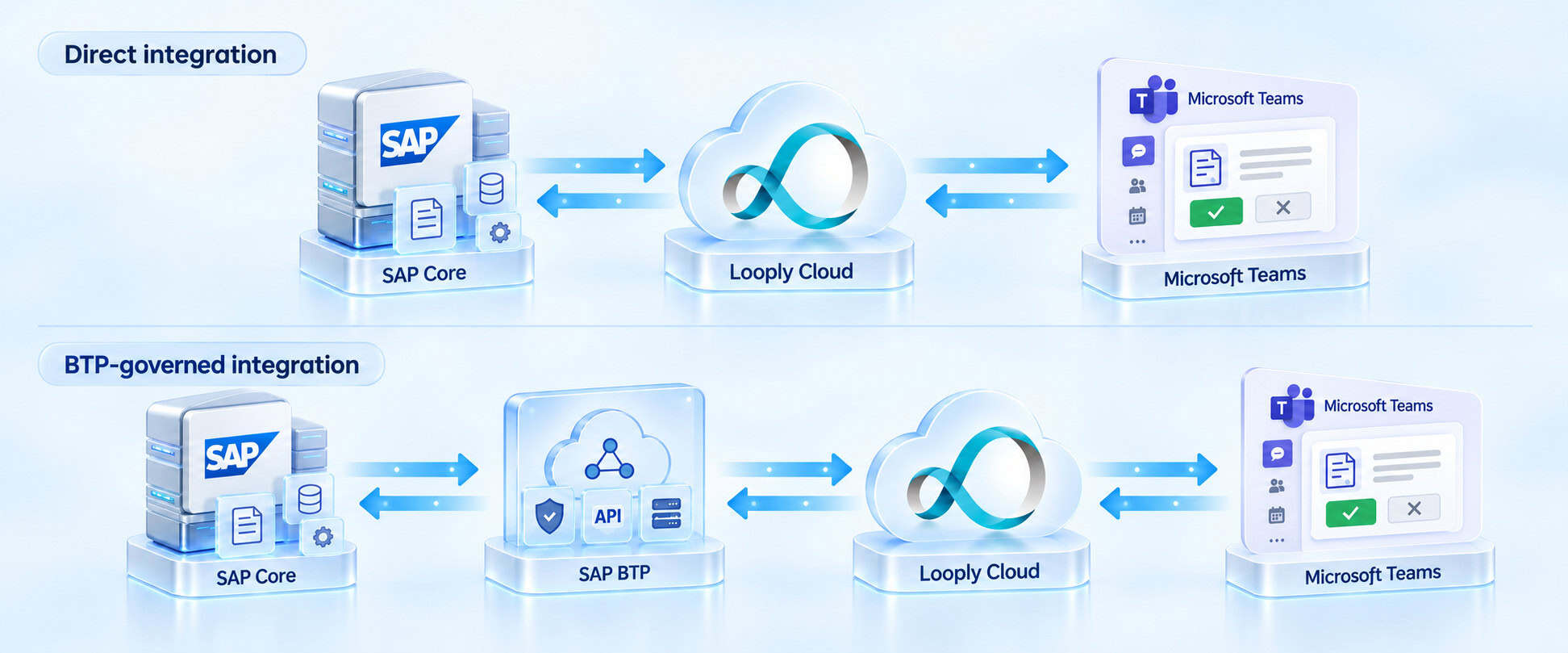
This creates two valid starting points:
- Direct integration: SAP and Looply communicate using the shortest appropriate route.
- BTP-governed integration: SAP BTP sits between Looply Cloud and the SAP backend and performs one or more defined functions.
These approaches are not mutually exclusive. A customer might use direct connectivity for the outbound call from the Looply Add-on while using BTP as the protected inbound route from Looply to SAP.
That is often a sensible design rather than an inconsistency.
Using the correct SAP terminology
SAP BTP is the overall technology platform. The services used within a Looply architecture have different responsibilities.
API Management is a capability of SAP Integration Suite. It provides a managed API boundary through which policies, authentication, traffic controls, monitoring and endpoint abstraction can be applied.
Cloud Integration is another capability of SAP Integration Suite. It performs message mediation through deployable integration flows, commonly called iFlows. It is relevant when messages need to be transformed, enriched, routed or orchestrated. It is not a generic name for every integration running on BTP. SAP describes SAP Integration Suite and its integration capabilities in its product documentation.
The SAP Connectivity service enables applications and services on BTP to connect to systems in a private network.
SAP Cloud Connector provides the controlled link between the customer’s BTP subaccount and the private network. It is not an Internet-facing reverse proxy that Looply calls directly.
A custom SAP BTP application may be used when application logic needs to run outside the ERP core. This includes applications built in SAP BTP, ABAP environment, using the ABAP Cloud development model, as well as applications created using other supported BTP development environments. SAP positions SAP BTP, ABAP environment as a platform for developing and running ABAP Cloud applications and side-by-side extensions. SAP BTP ABAP environment
SAP Build Process Automation is used where a BTP-managed business process is required. It is not simply another connectivity layer. SAP describes it as a service for creating workflow and task automations that can connect to SAP and third-party applications. SAP Build Process Automation
Keeping these terms precise helps prevent architectures in which several BTP components are added without a distinct purpose.
Outbound integration from SAP to Looply
Outbound integration begins with SAP.
For SAP S/4HANA or SAP ECC, the Looply Add-on already knows how to construct the request expected by the Looply Core API. It can identify the relevant process, assemble the payload and start or resume the correct Looply workflow.
In many cases, nothing else is required.
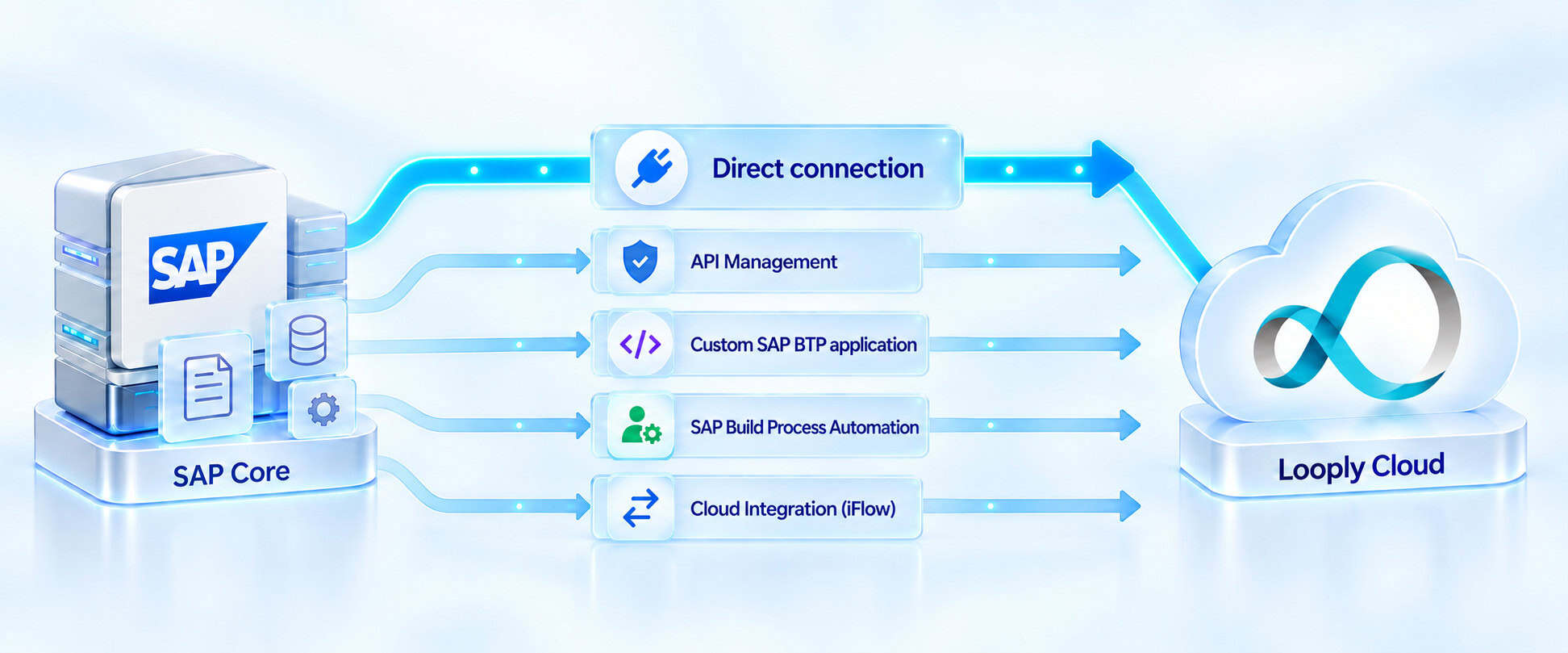
Direct connection
The normal starting point is:
Looply Add-on → Looply Cloud
The Add-on calls the Looply Core API directly over outbound HTTPS.
This route has the fewest moving parts and keeps the operational responsibility clear. It should remain the preferred option where the customer permits direct outbound communication.
API Management
Where customer policy requires outbound APIs to pass through BTP, the route can become:
Looply Add-on → API Management → Looply Cloud
API Management can apply access policies, traffic controls, monitoring and endpoint abstraction. The underlying Looply request can remain substantially unchanged.
This is an appropriate use of API Management because it is governing the API. It does not need to reproduce the business logic already present in the Looply Add-on.
Custom SAP BTP application
Some outbound scenarios need additional application logic before Looply is called.
A custom application on BTP could:
- retrieve information from several SAP services;
- validate or enrich the request;
- maintain BTP-side state;
- apply custom business logic; or
- construct a new service contract for a SAP product that does not have the Looply Add-on.
Where ABAP is the preferred development language, this could be an application in SAP BTP, ABAP environment using the ABAP Cloud development model.
The important distinction is that the application is performing genuine application processing. It should not be introduced merely to pass the existing Looply request through another component.
SAP Build Process Automation
SAP Build Process Automation is relevant when the SAP event starts or resumes a wider BTP-managed process.
That process might perform checks, call other applications, evaluate business rules or include additional human tasks before starting a Looply workflow.
In this scenario, SAP Build Process Automation owns part of the business process. It is not being used solely as a proxy between SAP and Looply.
Cloud Integration
Cloud Integration should be introduced when there is an integration problem to solve.
An integration flow may be appropriate where the outbound message requires:
- payload transformation;
- customer-specific field mapping;
- protocol conversion;
- content enrichment;
- conditional routing;
- several backend calls; or
- integration-specific retry and error handling.
If an iFlow simply receives the existing Looply Add-on request and forwards it unchanged, it is unlikely to add much value.
The outbound principle is therefore straightforward:
Start with the direct Add-on route. Add API Management for governance, or another BTP capability when its processing responsibility can be clearly stated.
Asynchronous enterprise-event architectures can also be used in appropriate SAP landscapes, but they are a separate design topic. They are not required for the normal request-and-response Looply integration described here.
Inbound integration from Looply to SAP
The case for BTP is often stronger in the inbound direction.
An inbound call may retrieve business data, post an approval or update an SAP object. Customers may not want an external SaaS platform to have a directly reachable route to their private SAP system.
BTP can provide the externally reachable boundary while the SAP system remains behind the customer’s private connectivity layer.
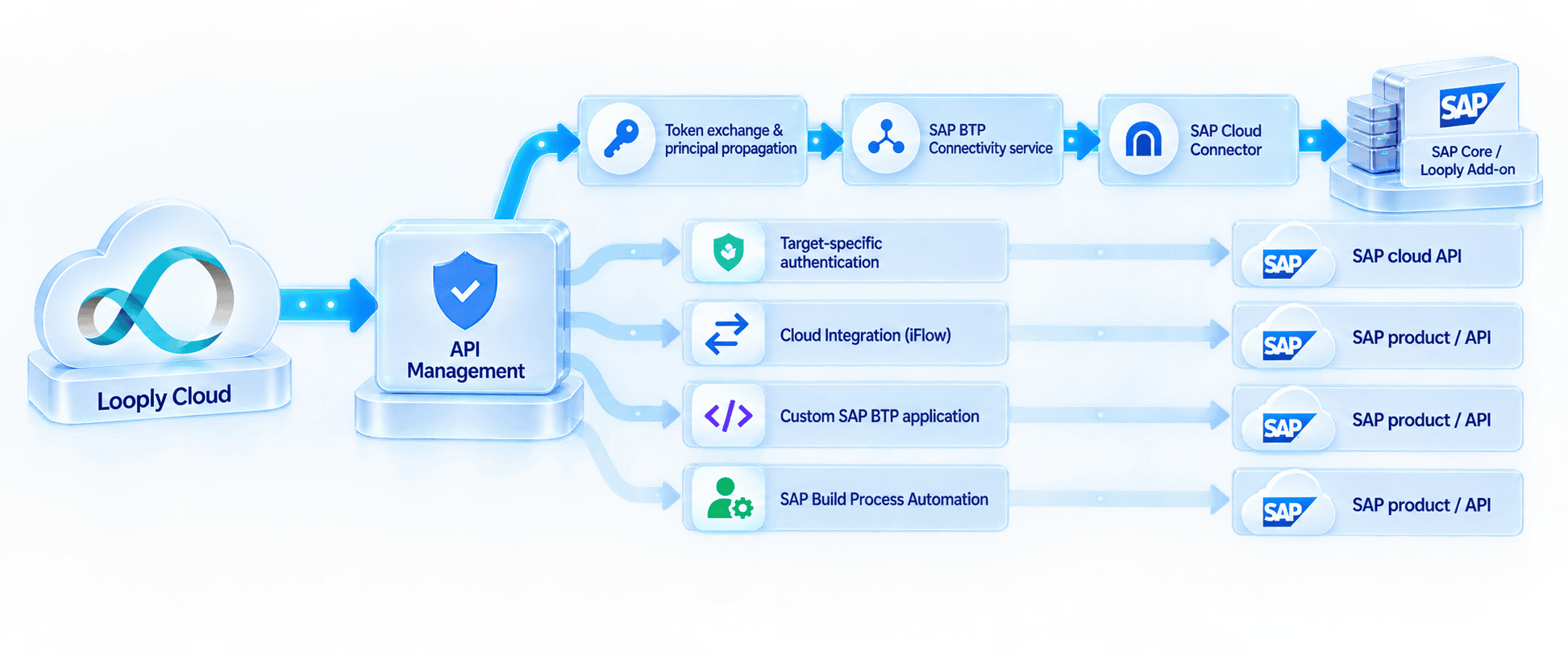
For a private SAP S/4HANA or SAP ECC system, the reference path is:
Looply Cloud → API Management → BTP identity and token exchange → SAP Connectivity service → SAP Cloud Connector → Looply Add-on
This architecture performs three important jobs:
- It provides a customer-controlled API boundary.
- It carries the end-user identity into the customer’s BTP trust domain.
- It reaches the private SAP system without exposing that system directly to the Internet.
API Management as the inbound front door
API Management exposes the endpoint called by Looply.
It can validate the incoming request, apply security policies, control traffic and provide API-level monitoring. It also gives the customer an endpoint that can remain stable even if the systems and services behind it change.
API Management should be regarded as the front door, rather than the component responsible for every downstream activity.
If mediation, application logic or process orchestration is required, the appropriate service can sit behind that API boundary.
Preserving the identity of the Teams user
For many Looply actions, it is important that SAP continues to see the real business user.
If Jane approves a purchase requisition in Teams, the preferred outcome is:
Teams user Jane → Looply user Jane → BTP principal Jane → SAP user Jane
The alternative—performing every update through one shared technical account—can weaken SAP authorisation checks and reduce the quality of the audit trail.
The token obtained when Jane signs in through Okta, Microsoft Entra ID or another identity provider cannot automatically be assumed to be suitable for BTP. Tokens have a specific issuer, audience, signature, lifetime, scopes and set of claims.
A common implementation therefore includes a token exchange or equivalent identity transition. The original delegated-user token is exchanged for a token that is valid within the customer’s BTP trust configuration while continuing to represent Jane.
The exact SAP service and policy configuration used for that exchange may differ between customers. The architecture should define the required outcome rather than claim that API Management itself always performs the complete exchange.
SAP documents OAuth token exchange as a supported mechanism for moving user context between security domains. OAuth Token Exchange Authentication
Principal propagation to private SAP systems
Once BTP has accepted the user context, the SAP Connectivity service carries it towards the private network.
SAP Cloud Connector then creates a short-lived X.509 client certificate representing the user. The SAP S/4HANA or SAP ECC system trusts the issuing certificate authority and maps the certificate identity to an existing SAP user.
The Looply Add-on service can then execute under that mapped SAP user and apply the normal SAP authorisation checks.
This means that two separate credential conversions may take place:
- Token to token: the Looply user is moved into the customer’s BTP trust context.
- User context to X.509 certificate: SAP Cloud Connector creates the short-lived certificate used against the private ABAP system.
SAP refers to this overall model as principal propagation. Principal propagation through API Management and principal propagation through Cloud Connector
Introducing BTP therefore does more than add another network hop. It can preserve the user identity across the boundary between Looply Cloud and the customer’s private SAP landscape.
An implementation point about BTP users
BTP may maintain a shadow user as the local representation of a federated identity.
Some customer trust configurations allow these users to be created automatically. Others require prior provisioning, role assignment or an identity provisioning process.
It should not be assumed that the first external Looply request will always create the necessary BTP user representation. First-time user behaviour should be confirmed with the customer’s identity and BTP specialists during implementation.
This does not change the reference architecture. It is a customer-specific configuration point that must be tested in the target landscape.
The corresponding SAP business user must also already exist. BTP shadow-user handling does not create the user in SAP S/4HANA or SAP ECC.
Connecting Looply to SAP cloud products
The same customer-controlled BTP boundary can be used when Looply communicates with an SAP cloud product such as SAP SuccessFactors, SAP Ariba or SAP Fieldglass.
However, the downstream authentication path is different.
Because the target is already cloud-hosted, SAP Cloud Connector is not used. Instead, BTP must use the OAuth, SAML bearer, JWT bearer or other delegated authentication mechanism supported by the target product and API.
The route may be as simple as:
Looply Cloud → API Management → SAP cloud API
If the target API already provides the required operation, API Management can protect and govern the call without introducing additional processing.
Where a simple Looply action must be translated into several product-specific calls, Cloud Integration can be placed behind API Management:
Looply Cloud → API Management → Cloud Integration iFlow → SAP cloud API
The iFlow might retrieve an object, map an identity, transform the payload, call several endpoints and return a consolidated result.
This is a good example of the separate responsibilities:
- API Management owns API exposure and policy.
- Cloud Integration owns message mediation and call orchestration.
- The SAP cloud product owns the business transaction.
A custom BTP application may be more appropriate if the requirement involves application state, complex validation or clean-core business logic rather than message mediation.
SAP Build Process Automation may be appropriate if the Looply action initiates or resumes a wider BTP-managed process.
One BTP boundary with several possible routes
A customer can use API Management as the common inbound boundary while selecting different downstream services for different SAP targets.
For example:
- private SAP S/4HANA or SAP ECC can be reached through the SAP Connectivity service and SAP Cloud Connector;
- an SAP cloud product can be reached through its supported cloud API;
- Cloud Integration can mediate a more complex interface;
- a custom SAP BTP application can perform side-by-side application logic; and
- SAP Build Process Automation can run a wider business process.
This gives Looply a consistent customer-controlled entry point without pretending that every backend has the same integration or authentication requirements.
Choosing the right BTP component
The decision should start with the responsibility, not the product name.
| Requirement | Appropriate approach |
|---|---|
| Simple outbound request from the Looply Add-on | Direct connection to Looply |
| Customer requires BTP governance for outbound APIs | API Management |
| Private SAP S/4HANA or SAP ECC must not be directly reachable | API Management, identity transition, SAP Connectivity service and SAP Cloud Connector |
| Straightforward call to an SAP cloud API | API Management with target-specific authentication |
| Mapping, transformation or several backend calls | Cloud Integration using an integration flow |
| Custom clean-core application logic outside ERP | Custom SAP BTP application, potentially in SAP BTP, ABAP environment |
| Wider process orchestration or additional human tasks | SAP Build Process Automation |
This leads to a useful design rule:
Do not use BTP merely because BTP is available. Give every BTP component a specific job.
A practical reference architecture
For outbound integration from SAP S/4HANA or SAP ECC, the direct Looply Add-on route should normally remain the starting point:
Looply Add-on → Looply Cloud
API Management can be added where the customer requires BTP governance. Cloud Integration, a custom BTP application or SAP Build Process Automation should be added only where there is a corresponding integration, application or process requirement.
For inbound integration to private SAP S/4HANA or SAP ECC, the preferred BTP pattern is:
Looply Cloud → API Management → token exchange and principal propagation → SAP Connectivity service → SAP Cloud Connector → Looply Add-on
For SAP cloud products, the preferred route is:
Looply Cloud → API Management → target-specific authentication → SAP cloud API
These are reference patterns rather than rigid prescriptions. The final design must reflect the customer’s identity provider, BTP trust configuration, SAP landscape, API policies and security standards.
Start simple and extend where needed
Looply does not require customers to rebuild their SAP integration architecture.
The basic proposition remains simple: bring SAP business processes into Microsoft Teams, allow people to act where they already work and return those actions safely to SAP.
SAP BTP can strengthen that proposition where customers need additional governance, identity handling, private connectivity, integration logic or clean-core extensions.
The objective is not to put as many BTP services as possible between SAP and Looply. It is to use the right service for each responsibility:
- API Management for the governed API boundary;
- Cloud Integration for genuine mediation;
- the SAP Connectivity service and SAP Cloud Connector for private connectivity and principal propagation;
- a custom SAP BTP application for side-by-side application logic; and
- SAP Build Process Automation for wider process orchestration.
That approach gives customers flexibility without unnecessary complexity—and allows Looply to fit naturally into both direct SAP landscapes and broader SAP BTP integration strategies.