
Beyond Forms: The Real Challenge of SAP Process Digitisation
Despite years of digital transformation initiatives, many SAP customers still rely on manual processes built around Excel spreadsheets, Word documents, email chains, and shared inboxes. These processes are often critical to day-to-day operations — particularly in HR, Finance, and Procurement — yet they sit awkwardly outside SAP.
This isn’t because organisations lack ambition or technology. It’s because digitising manual processes in SAP is harder than it first appears.
Today, there is no shortage of tools that claim to solve this problem. Native SAP development, low-code platforms, workflow engines, service portals, and custom-built applications are all commonly used. At first glance, many of these approaches appear interchangeable.
They are not.
All Digitisation Is Not Equal
Most digitisation initiatives start with familiar goals: reducing manual effort, improving user experience, and speeding up approvals. All of these are valid.
However, many initiatives fail to deliver lasting value. Not because the user interface is poor — but because the execution model is wrong.
When SAP is the system of record, the critical question is not “How do users submit data?”
It is “How is SAP data validated, approved, and safely written back?”
This is where different approaches diverge sharply.
Form vs Execution: Why the Difference Matters
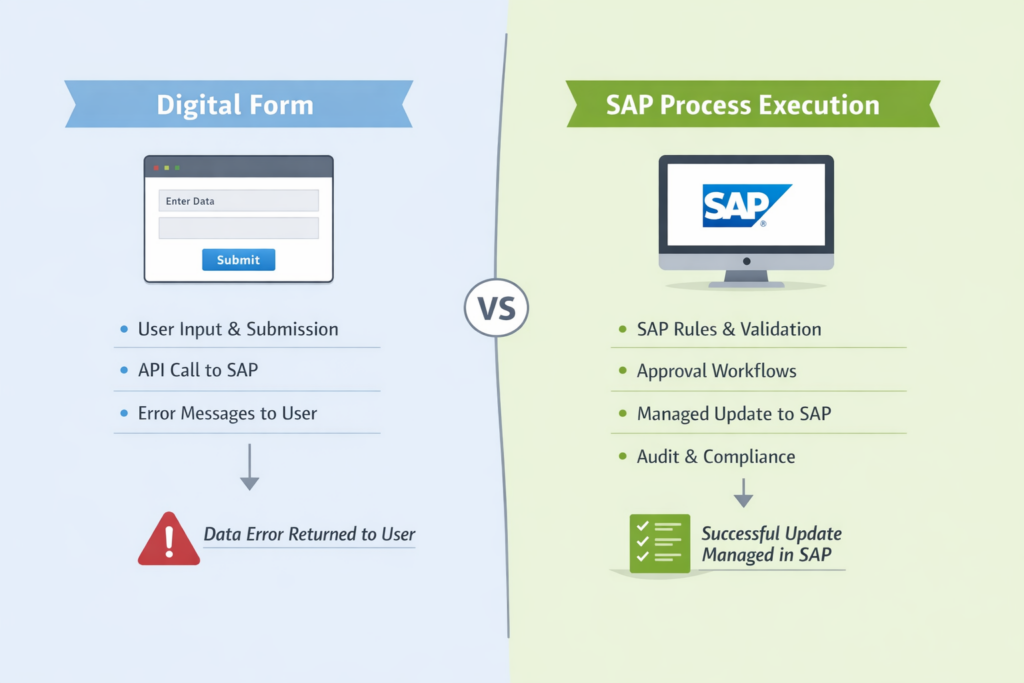
A digital form typically focuses on capturing user input and submitting it to SAP via an API. If something goes wrong, the error is often returned directly to the user.
SAP process execution is fundamentally different. SAP rules, validation, approvals, and update logic are applied inside SAP itself, with errors handled by the system, not exposed to end users.
Digitising a form is not the same thing as digitising a process — and confusing the two is one of the most common causes of failed SAP digitisation initiatives.
What Actually Matters When Digitising SAP Processes
Across SAP programmes of all sizes, the same success factors appear again and again. These are not vendor-specific — they are SAP realities.
SAP controls identity and access
SAP authorisations are rarely simple role checks. They are contextual, data-driven, and deeply embedded in business logic. If identity and access drift away from SAP, those rules must be recreated — and maintained — elsewhere.
Data is pre-populated from SAP
Manual processes often exist because SAP data is complex. Expecting users to re-enter known information increases error rates and rejection cycles. Real-time data pre-population is essential to data quality.
Value helps reflect SAP configuration
Cost centres, organisational units, vendors, pay components, and accounting structures change frequently. If selectable values are copied into another platform, they immediately begin to drift.
Validation happens at the point of entry
Late validation is one of the biggest sources of frustration. If errors are only discovered after submission — or approval — the process becomes slower and less trusted than the manual alternative.
Approvals follow SAP rules
Approval logic depends on organisational structures, thresholds, substitutions, and exceptions. Recreating this logic outside SAP increases cost and almost always simplifies reality.
Updates are managed, not exposed
When data is written back to SAP, errors should be logged, recoverable, and retryable — not returned to users as technical messages. Otherwise, the user becomes the integration layer.
The solution respects SAP landscapes
DEV–QA–PRD alignment, transport management, regression testing, and support cycles matter. In SAP environments, maintenance cost usually exceeds build cost.
What Actually Matters – Summary
| What matters | Why it matters in SAP |
| SAP authentication and authorisation | Prevents duplication of complex, data-driven access rules |
| Automatic data pre-population | Reduces errors and rejection cycles |
| SAP-driven value helps | Keeps selectable values aligned with configuration |
| Validation at point of entry | Avoids late rework and loss of trust |
| SAP-based approvals | Preserves organisational and audit logic |
| Managed SAP updates | Prevents users becoming “integration handlers” |
| DEV–QA–PRD alignment | Reduces long-term maintenance and support cost |
The Main Approaches to Digitising SAP Processes
In practice, most organisations gravitate towards one (or more) of three broad solution types. Each can be effective — when used for the right purpose.
Native SAP Development
This includes custom SAP Fiori applications, SAP Build Apps, SAP Build Process Automation, and side-by-side extensions on SAP BTP (particularly common in SuccessFactors landscapes).
Native approaches provide strong alignment with SAP and deep control over behaviour. However, they typically require specialist skills and involve higher development, testing, and maintenance effort. Every change can quickly become a mini-project.
Third-Party and Custom External Solutions
This category includes low-code platforms such as Mendix and Microsoft Power Apps, service platforms like ServiceNow, as well as bespoke web applications or chatbot interfaces deployed via portals or Microsoft Teams.
These solutions often excel at user experience, request intake, and cross-system orchestration. However, because they sit outside SAP, they typically rely on API-based integration, duplicated validation and approval logic, and external error handling. As SAP update requirements become more complex, governance and long-term ownership can become challenging.
SAP-Embedded Execution Platforms
The third category focuses on solutions embedded directly within the SAP environment, designed specifically to digitise manual processes while keeping SAP in control of execution. This is where Stelo and Varo sit.
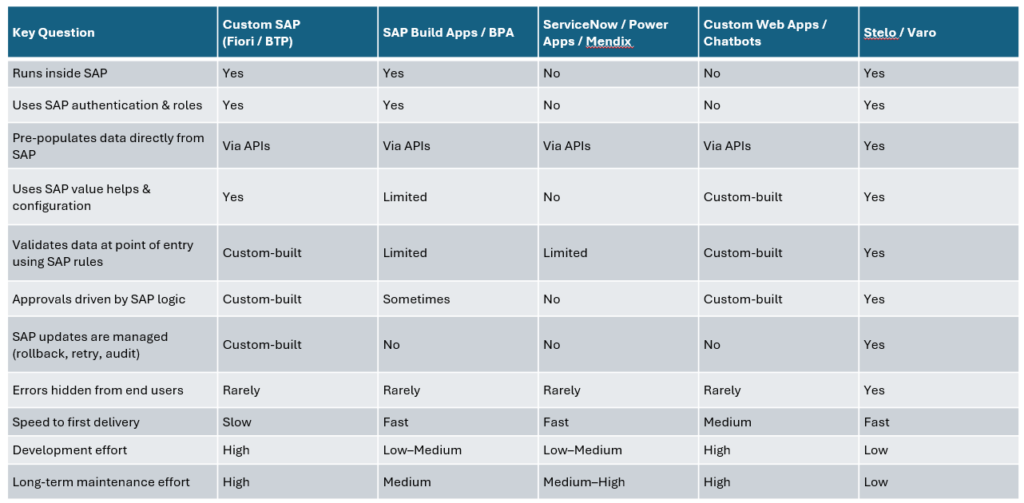
SAP-embedded platforms reuse SAP authentication, data models, validation rules, approval logic, and transport mechanisms, while avoiding the full build burden of custom development. The result is high SAP fit with lower long-term ownership effort.
Summary of the Approaches
| Approach type | Examples | Where it fits best | Common trade-offs |
| Native SAP development | Custom Fiori, SAP Build, SAP BPA, BTP extensions | SAP-centric processes needing bespoke control | High build and change cost |
| Third-party / external | Mendix, Power Apps, ServiceNow, custom web apps, chatbots | Intake, UX, orchestration across systems | Duplicated rules, SAP drift |
| SAP-embedded platforms | Stelo, Varo | SAP execution: validation, approvals, managed updates | Focused on SAP-centric processes |
Seeing the Trade-Offs Clearly
When these approaches are evaluated against SAP fit and long-term effort, clear patterns emerge.
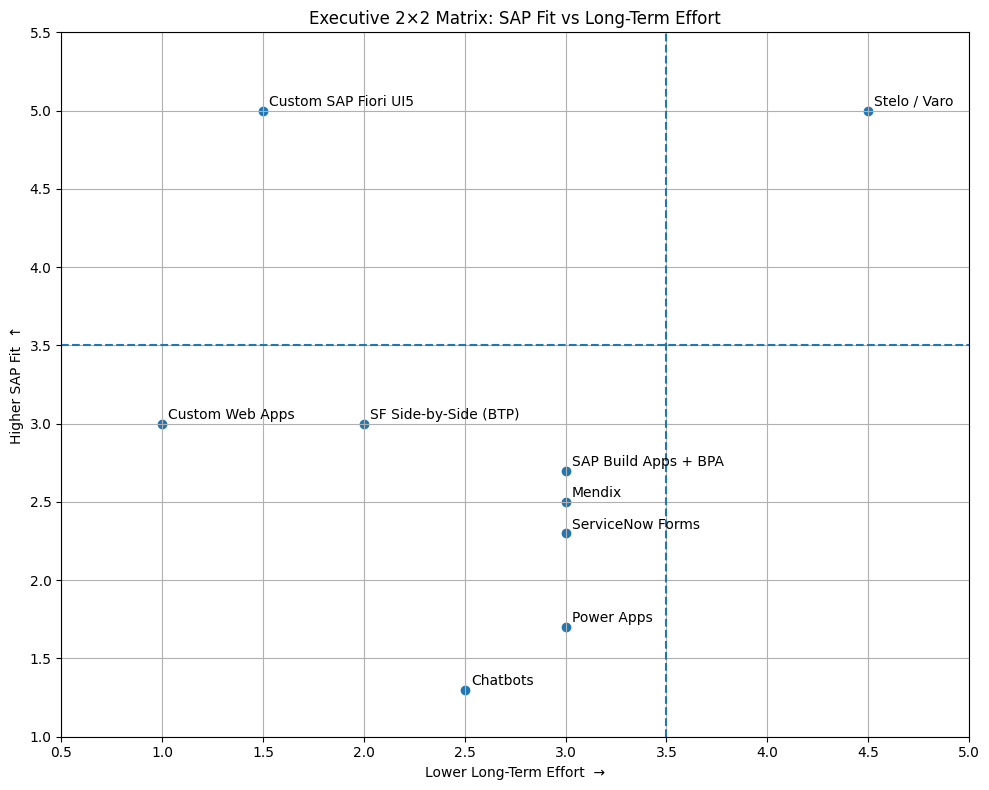
The quadrant isn’t a buying guide. It visualises where execution responsibility sits — and what that means for long-term cost and risk.
What the Quadrant Reveals
- Custom SAP development delivers high SAP fit, but often with high long-term effort as change accumulates.
- External low-code and service platforms accelerate delivery, but SAP fit depends heavily on integration discipline and duplicated logic.
- Custom external builds can be flexible, but frequently introduce parallel execution models that are expensive to test and support.
- SAP-embedded execution platforms are designed specifically to keep execution inside SAP, delivering SAP-grade control with lower long-term effort.
Why Stelo and Varo Sit Differently
Stelo and Varo are built around a simple assumption:
If a process updates SAP business data, SAP should remain in control of execution.
They focus on:
- native SAP authentication and authorisations
- automatic data pre-population and value helps
- SAP-based validation and approvals
- managed updates with rollback, retry, and audit
- alignment with SAP transport and governance models
This is why they sit in a different position on the quadrant — not because they are generic form tools, but because they are designed for SAP process execution.
One Size Rarely Fits All — But Fewer Sizes Are Better
In practice, most organisations use more than one approach:
- orchestration tools for cross-system workflows
- service platforms for request intake
- SAP-embedded solutions for execution and control
That is normal.
However, every additional approach introduces new skillsets, new lifecycle models, more integration points, and higher long-term maintenance cost. While one size does not fit all, the number of execution models should still be kept deliberately small.
In SAP landscapes, simplicity is not just architectural elegance — it is a cost-control strategy.
A Practical Rule of Thumb
If a process coordinates activity across systems, an external orchestration tool may be appropriate.
If a process updates SAP business data, it should execute inside SAP.
Once that distinction is clear, the right combination of approaches usually becomes obvious.