



Teams Chat as a Universal Inbox
Teams Chat as a Universal Inbox
Bringing enterprise approvals to managers instead of asking managers to find them
Enterprise managers are not short of inboxes.
They have email inboxes, SAP inboxes, procurement portals, HR systems, finance systems, service management queues, mobile apps, collaboration tools and reporting dashboards. In many organisations, important work can arrive from almost anywhere: SAP S/4HANA, SAP Ariba, SAP Fieldglass, SAP Concur, SuccessFactors, ServiceNow, Oracle, Workday, Jira, custom applications, shared mailboxes and ordinary email threads.
The problem is not that work does not exist in a system somewhere. The problem is that important work is scattered across too many places, and managers are expected to keep checking them all.
This is why the phrase “universal inbox” is becoming more common. It describes a real frustration. Budget holders, line managers and senior managers are often responsible for approving requests across several different business systems. They may need to approve a purchase requisition in one place, a supplier change in another, an HR request somewhere else, and a service request in a completely different platform.
The idea of a universal inbox sounds attractive because it promises one place for all of this work. But the real question is not simply:
Where can managers see all their work?
The more important question is:
How can the right work reach the right manager at the right time, with enough context to act?
That distinction matters. A universal inbox can help users find work. But for busy managers, the better answer may be to make the work find them.
The real problem: too many places to manage work
Most enterprise workflow problems do not begin with a lack of technology. They begin with a fragmented user experience.
A business process may start in SAP, Ariba, Fieldglass, Concur, SuccessFactors, ServiceNow or another enterprise platform. That system may then send an email notification. The manager may need to log into the originating system, navigate to the right task, review the details, consult a colleague in Teams, return to the system, approve or reject, and then move back to whatever they were doing before.
This pattern is familiar, but it is inefficient. It relies on managers noticing the right email, understanding what needs to be done, and finding time to access the right system. If the manager is travelling, in meetings, working from a mobile device or simply dealing with a high volume of messages, the task can easily be missed or delayed.
Looply was created in response to this exact problem: managers work across multiple systems, face too many inboxes, portals and mobile apps, fall back on email, and then become swamped by internal notifications. The result is that actions are missed or delayed.
This is especially important because the users affected are often not specialist back-office users. They are not sitting in SAP all day. They are budget holders, line managers and senior managers. They spend much of their day in meetings, conversations and decisions. Increasingly, that means they spend their day in Microsoft Teams.
So any solution needs to be judged against a simple test:
Does it require the manager to go looking for work, or does it bring the work to the manager?
Why the universal inbox idea is attractive
The appeal of a universal inbox is easy to understand. It promises to gather tasks from multiple systems and present them in one place.
For a manager, this could mean one place to see pending approvals from procurement, HR, finance, supplier management, service management and other business areas. For IT, it could mean a cleaner architecture for task visibility. For the business, it could mean fewer missed approvals, fewer delayed decisions and less reliance on email.
SAP Task Center is a good example of this concept in the SAP ecosystem. It is designed to bring tasks from multiple SAP products into a central task experience, including systems such as SAP Ariba, SAP Concur, SAP Fieldglass, SAP Field Service Management, SAP S/4HANA and SAP SuccessFactors. The model relies on bringing tasks into a cache so that they are quickly available to users.
That architecture makes sense. If a central inbox has to call several enterprise systems every time a user opens it, performance will suffer. A proper universal inbox normally needs a persistent store of current work items, updated by events, polling jobs or both.
But this is where the idea becomes more complicated.
A universal inbox may solve the task visibility problem, but it does not automatically solve the manager attention problem. If the manager still needs to open a separate portal, app or work queue to find out what needs attention, then the organisation has created another place to check.
That may be useful for some users. It may not be the best answer for busy managers.
Five possible approaches
There are several ways organisations might try to address the problem of scattered approvals and tasks. Each has value, but each also has limitations.
1. Use AI to manage the email inbox
One obvious approach is to use an AI assistant to monitor email, identify important messages, summarise threads and highlight tasks that may require action.
This can help. Many managers are overwhelmed by email, and AI can make it easier to spot urgent or important messages. But it does not change the underlying process. The organisation is still relying on email as the main workflow channel.
That creates several problems. Email notifications can become outdated. They may not contain enough context. They can be forwarded, missed, duplicated or buried in long threads. Most importantly, the actual approval action often still has to happen somewhere else.
AI can make email easier to manage, but it does not turn email into a governed enterprise workflow platform.
2. Use SAP Task Center for SAP tasks
For SAP-centred landscapes, SAP Task Center is a serious option. It provides a standard SAP approach for consolidating tasks across supported SAP solutions.
For organisations already invested in SAP Build Work Zone and SAP BTP, this can be a strong fit. It gives users a central place to access SAP tasks and can reduce the need to visit individual SAP applications.
But the manager question remains. Is this where the manager already works?
If a manager spends their day in Microsoft Teams, meetings, chat and email, then asking them to open a BTP or Work Zone task experience may still be a pull-based model. The work has been consolidated, but the manager still has to go and find it.
SAP Task Center is a strong SAP-centric answer to task consolidation. But for many managers, the issue is not only whether tasks can be consolidated inside the SAP ecosystem. It is whether those tasks reach them in the place where their attention already is.
3. Build a custom universal inbox
Another approach is to build a custom inbox: perhaps a web app, Power App, Teams tab or custom portal that pulls in tasks from multiple systems.
At first, this sounds straightforward. Build a table. Connect to the APIs. Show the manager everything waiting for them.
In practice, this is much harder.
If the app calls multiple enterprise systems on demand every time a manager opens the page, the experience may be slow and unreliable. Each source system has its own API structure, authentication model, performance profile, data model and security rules. Some APIs will support filtering by timestamp or status. Others will not. Some systems identify users by email. Others use internal user IDs, employee numbers, usernames, groups or system-specific identifiers.
An on-request inbox approach is flawed because it relies on user action and may involve a significant delay while the data is loaded.
To make a custom universal inbox work properly, the organisation usually needs a separate task cache. That means polling jobs, checkpoints, source-system connectors, user mappings, normalised task structures, action APIs, error handling, retry logic, monitoring, security controls and ongoing maintenance.
The front-end screen is the easy part. Keeping the task list accurate, current, secure and actionable across multiple enterprise systems is the hard part.
4. Use Copilot, Joule or another AI assistant as a chatbot interface
Another possibility is to use AI as the interface. A manager might ask:
Do I have anything to approve?
The assistant could search connected systems, summarise open tasks and perhaps allow the user to approve or reject through a conversational experience.
This is a compelling idea, and conversational access will almost certainly play a role in the future of enterprise work. But it does not remove the underlying integration challenge. The AI assistant still needs trusted access to the relevant systems. It must know which tasks are open, who is authorised to act, what context is required, and how to post the decision back safely and audibly.
It is also still largely a pull model. The manager has to remember to ask.
That may be useful in some scenarios, but it is not the same as being notified at the moment when action is required. A chatbot can help a manager ask about work. It does not necessarily ensure that important work reaches the manager at the right time.
5. Bring work items into Teams with Looply
The fifth approach is different.
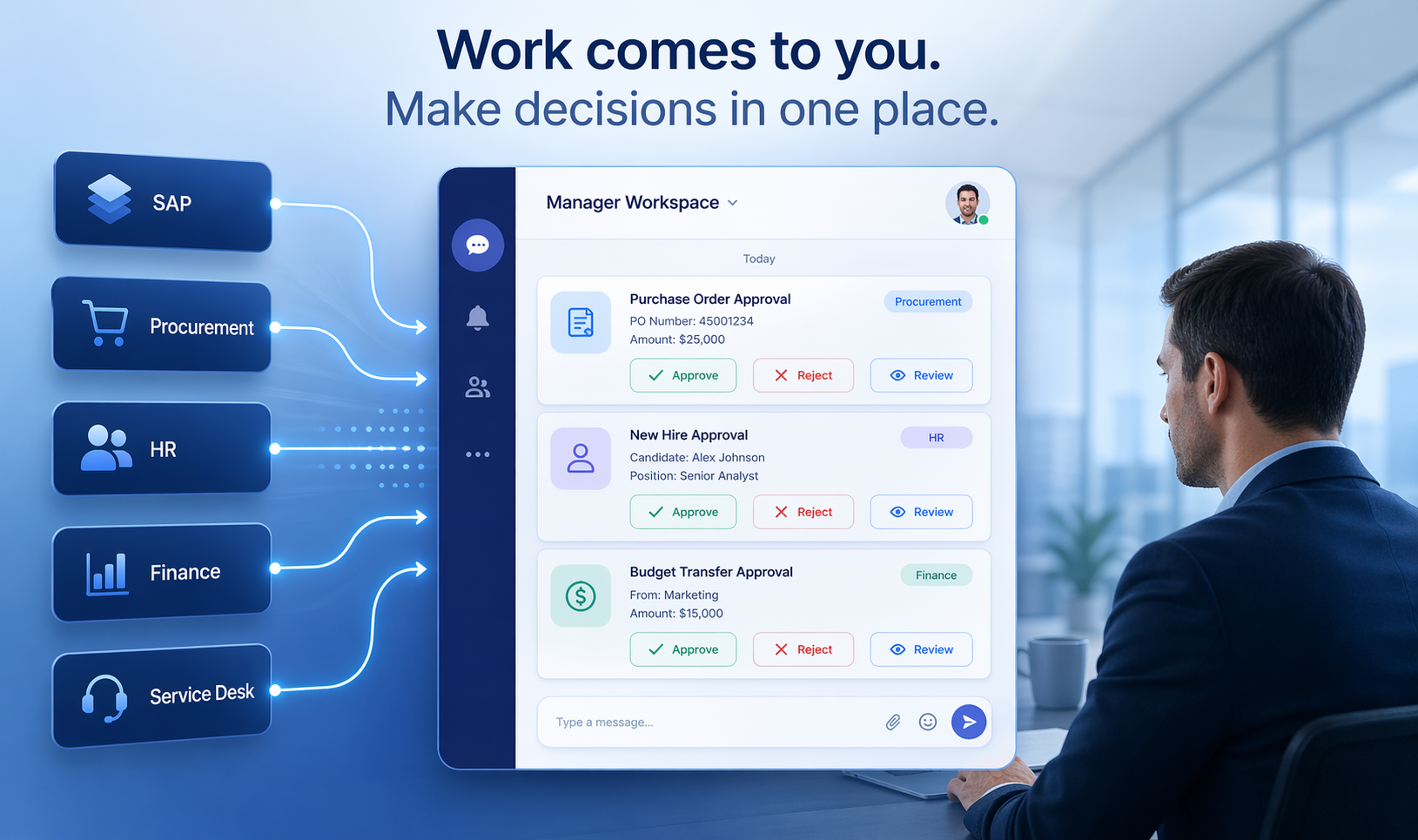
Instead of asking managers to monitor another inbox, Looply brings work items into Microsoft Teams as actionable Adaptive Cards. These cards can contain the key business information, the available actions, and links back to the source system where needed. The manager can review, approve, reject, comment or take another configured action directly from Teams.
This changes the behaviour. The manager does not need to open a portal to discover whether work exists. The work arrives in the collaboration environment they already use.
That is why Teams Chat can act as a practical universal inbox.
Pull versus push: the decisive difference
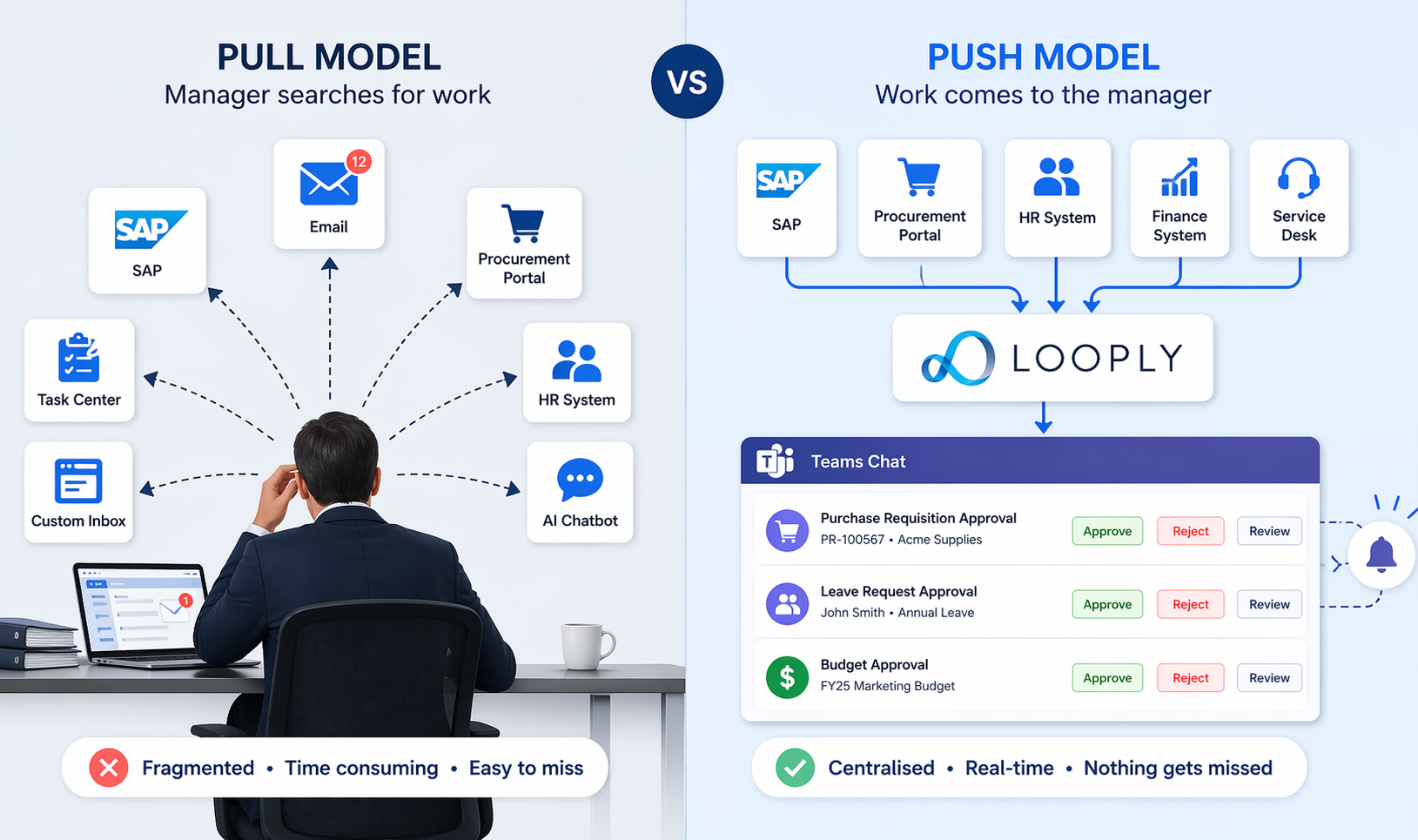
Many solutions to the universal inbox problem are still pull-based.
The manager opens a portal.
The manager checks a custom app.
The manager logs into a task centre.
The manager asks an AI assistant.
The manager searches email.
In each case, the manager has to go looking for work.
A push-based model is different. The work item is delivered to the manager when attention is needed. From the user’s perspective, this is the important part. They are notified when something requires action, and they can respond in the flow of their working day.
Technically, the implementation may involve a mixture of approaches. Some systems can push work items or workflow events out. Some systems provide event-driven configuration. Some systems only expose APIs that must be called on a schedule: a polling job to discover new or changed work, followed by additional API calls to retrieve details and post decisions back.
But from the manager’s perspective, the best experience is still push.
That is the key point. A platform may need to use polling behind the scenes, but the user experience should not feel like polling. It should feel like the work arrives when it matters.
Polling where necessary, push where possible
In an ideal world, every enterprise system would publish a clean workflow event when a task is created, changed, reassigned or completed. The integration platform could receive that event, enrich the payload, deliver the right notification and update the source system when the user acts.
Some systems can support this kind of pattern. For example, the Fieldglass integration analysis considered an event-driven configuration approach where events such as submit, approve, final approval, reject and withdraw could be used to call Looply workflow trigger or resume APIs.
But many enterprise systems do not expose the right workflow events, or they expose them only in limited scenarios. In those cases, polling is necessary.
Polling should not mean repeatedly downloading everything. A robust polling pattern needs to ask what has changed since the last successful run. It needs to store a checkpoint, such as a timestamp, sequence number or other cursor. It needs error handling so that failures do not cause missed or duplicated work. It may also need user mappings so that source-system approvers can be matched to Microsoft Teams users.
SAP Ariba is a useful example of the kind of pattern involved. For Ariba Buying, Invoicing and user profile approvals, the integration approach can involve using endpoints such as GET /changes or GET /pendingApprovables, then fetching the details of the specific approvable, identifying eligible approvers and finally sending the approval decision back through the relevant API.
That is not the same thing as building a full universal inbox cache. A polling job for Teams-based work delivery does not necessarily need to store every open task so that it can be displayed in a separate inbox. It needs to store enough operational state to poll reliably, avoid duplicates, route work to the right person and correlate later updates.
This is an important distinction.
A universal inbox cache exists to display a current task list.
A polling checkpoint exists to support reliable work discovery and delivery.
For Looply, the practical requirement is the second: store timestamps, checkpoints, user mappings and correlation data so that systems without push-based workflow events can still be integrated into Teams-based action flows.
Why custom universal inboxes are harder than they look
The build-your-own universal inbox approach can be attractive because it appears to offer complete control. Organisations may imagine a single app that brings together every approval from every enterprise system.
However, the complexity grows quickly.
Each source system needs to answer several questions:
- What work items are currently open?
- What has changed since the last check?
- Who is allowed to act?
- What actions are available?
- What detail is required before a decision can be made?
- How is the decision posted back?
- How do we know the task has been completed elsewhere?
- How do we remove or update outdated items?
- How do we handle substitute approvers, groups, delegations and escalations?
Then there is the user identity problem. A source system may assign work to an SAP username, an Ariba uniqueName, a Fieldglass user, an employee number, a group, or some other internal identifier. Teams needs a Microsoft identity. If the integration cannot reliably map source-system users to Teams users, the whole experience breaks down.
A custom inbox also needs ongoing maintenance. APIs change. Authentication models change. Business processes change. New systems are added. Security requirements evolve. The organisation that builds the inbox becomes responsible for maintaining the integration layer indefinitely.
This does not mean a universal inbox is never appropriate. It means that it is not simply a UI project. It is an enterprise integration product.
Teams Chat as a practical universal inbox
A universal inbox is usually imagined as a table: one row per task, with filters, statuses, due dates and links.
Teams Chat offers a different model.
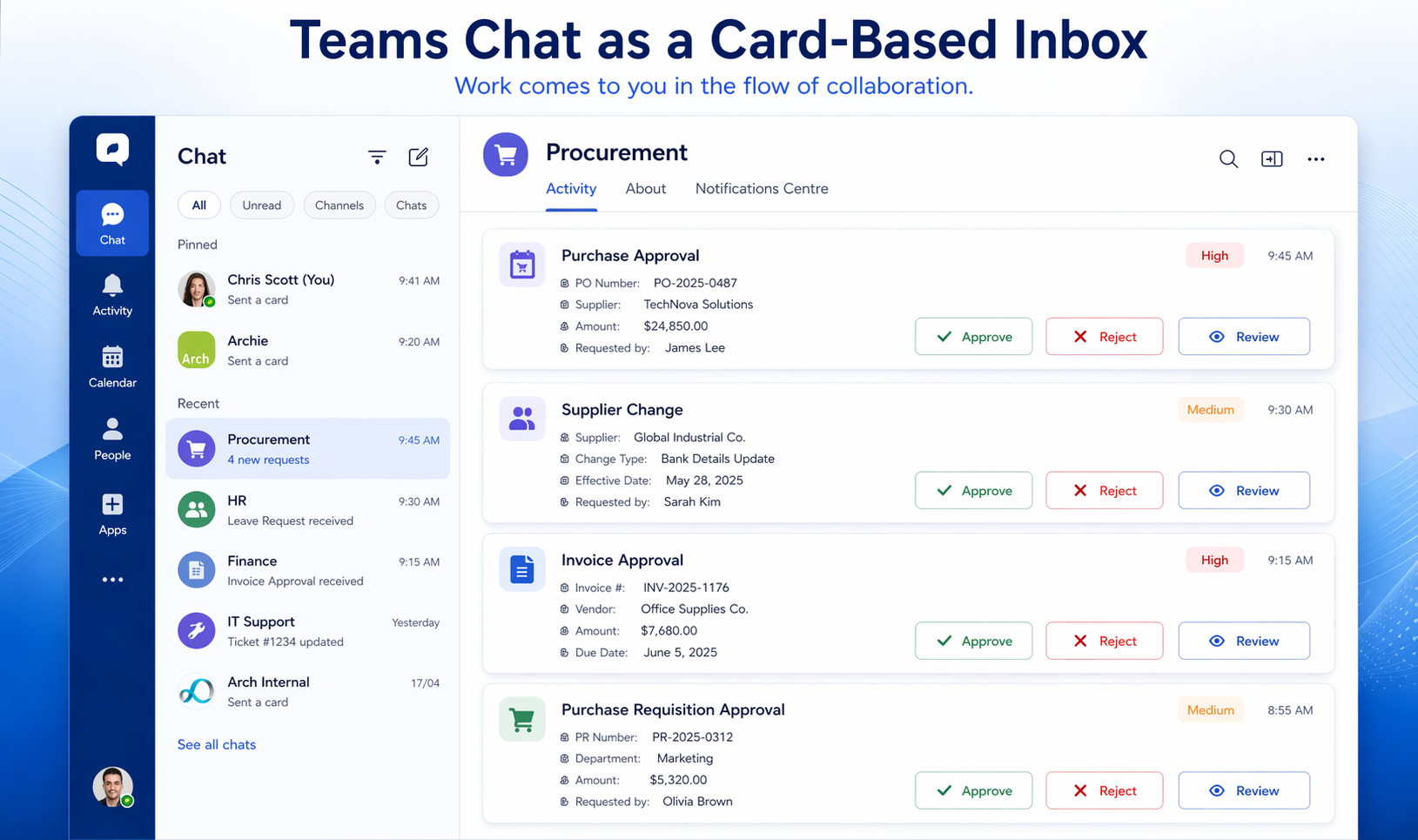
In Teams, each work item can appear as an Adaptive Card. The card can show the most important information, present the available actions, and include links to the source system where deeper review is needed. The conversation around the task can happen in the same environment where the notification arrives.
Work can also be grouped naturally. Procurement approvals can arrive through one Looply app or chat. HR approvals can arrive through another. Finance approvals, supplier changes, service requests or compliance tasks can each be organised in a way that makes sense to the business.
This gives users a practical version of a universal inbox without forcing them into another task table.
Instead of opening a separate app to discover whether anything is waiting, the manager is notified when a new item arrives. Instead of searching across systems, the work appears in Teams. Instead of relying on email, the task is presented as a structured card with actions.
Looply Notifications Centre adds another important layer. It provides a central place where users can track notifications, check statuses and find previous items without scrolling endlessly through chat history. Looply Notification Centre provides a way to bring actions, alerts and history into one easy-to-navigate space, reducing the risk of incomplete tasks and improving process transparency.
This means Teams Chat can serve two purposes at once: It acts as the notification channel when new work arrives, and, with the Notification Centre, it gives users a structured way to review what has been sent, what has been actioned and what still needs attention.
The manager experience
The most important test is not technical elegance. It is whether the solution fits the way managers actually work.
Budget holders, line managers and senior managers spend their day in meetings, calls, chat, documents and decisions. They are not usually workflow specialists. They are not likely to spend their day inside BTP. They may not want to open a custom inbox app. They may not remember to ask an AI assistant whether something is waiting. They may not trust email to show the full picture.
But they are already in Teams.
That makes Teams a natural place to deliver enterprise work. It is where managers are already discussing budgets, suppliers, projects, resources and decisions. It is where meetings happen. It is where urgent messages are noticed. It is where mobile access is familiar.
This is the strength of the Looply approach. It does not ask managers to adopt a new work queue. It brings the approval or task into the collaboration flow they already use.
The practical benefit of a universal inbox, without another place to check
The universal inbox idea is valuable because it recognises a real problem: enterprise work is fragmented.
But the danger is that organisations respond by creating yet another place managers must remember to check.
For some users, a traditional task inbox will be appropriate. Specialist users who work in SAP, procurement, HR or finance systems all day may prefer to manage work in the source system or in a central work queue. But occasional approvers are different. They need the work to reach them.
Looply’s approach is to combine the practical benefits of universal task access with the immediacy of Teams-based delivery.
Where a source system can push a workflow event, Looply can use that event.
Where a source system cannot push work out, Looply can use polling to discover new or changed work items.
Where user identities differ across systems, mappings can connect source-system users to Microsoft Teams users.
Where the manager needs to act, Looply can deliver an actionable Adaptive Card.
Where the manager needs to review previous items, the Notifications Centre provides a structured view.
The result is not a traditional universal inbox. It is a Teams-based work surface.
Don’t make managers search for work
The universal inbox is a useful concept, but it should not become the goal in itself.
The real goal is to reduce missed work, delayed approvals, unnecessary context switching and over-reliance on email. For managers, the best experience is not another inbox, portal or chatbot. It is work arriving in the place where they already spend their day.
That is why Teams Chat is such a powerful model.
A traditional inbox helps managers find work, whereas Looply helps work find managers.
By combining workflow integration, polling where necessary, user mapping and actionable Teams cards, Looply gives organisations a practical way to bring enterprise approvals and tasks into Microsoft Teams. Managers do not have to keep checking multiple systems. They do not have to rely on email. They do not have to open yet another work queue just to see whether something needs attention.
The work comes to them.