



Getting SAP Approvals into Microsoft Teams: Choosing the Right Integration Approach
This article outlines the main architectural approaches for delivering SAP approvals into Microsoft Teams, explains the business requirements that determine which approach fits best, and provides a practical framework to help organisations choose the right option for their SAP landscape.
In many organisations, a two-minute SAP approval becomes a two-day delay simply because the approver never sees it at the right time.
For most organisations, the question of where people work has already been answered. Day-to-day execution happens in Microsoft Teams. What remains less clear is how critical business work — created, governed, and audited in SAP S/4HANA — should reach users at the moment action is required.
This gap between systems of record and systems of engagement is where productivity is quietly lost. Approvals wait unnoticed, cycle times lengthen, and follow-ups multiply — not because SAP is inaccessible, but because work does not arrive where people actually operate.
This article explores the main architectural approaches for integrating SAP work into Microsoft Teams and introduces a requirement-driven framework for selecting the right approach, rather than defaulting to platform preference.
1. The productivity gap between SAP and Microsoft Teams
SAP underpins core enterprise processes: finance, procurement, HR, logistics. At the same time, Microsoft Teams has become the place where users prioritise work, communicate, and make decisions.
The friction appears when:
- A process reaches a decision point in SAP
- The user is working in Teams
- Action depends on email alerts, inboxes, or manual checking
The issue is not access to SAP. It is timing and attention. Execution breaks down when users must remember to leave their primary workspace to find work elsewhere.
The problem to solve is therefore not visibility, but reliable execution.
2. What “SAP and Teams integration” really means
“Sap–Teams integration” is often treated as a single capability. In practice, it covers very different outcomes:
- Viewing SAP data in Teams
- Querying SAP from Teams
Only the final two outcomes — notification and task completion — materially change approval cycle times.
- Being notified about SAP activity
- Completing SAP tasks directly in Teams
Each outcome implies a different technical pattern and a different user behaviour model. Problems arise when an approach designed for visibility or insight is used for execution.
Before choosing a solution, it is essential to be clear about what users are expected to do in Teams, not just what information should appear there.
3. The main integration approaches available today
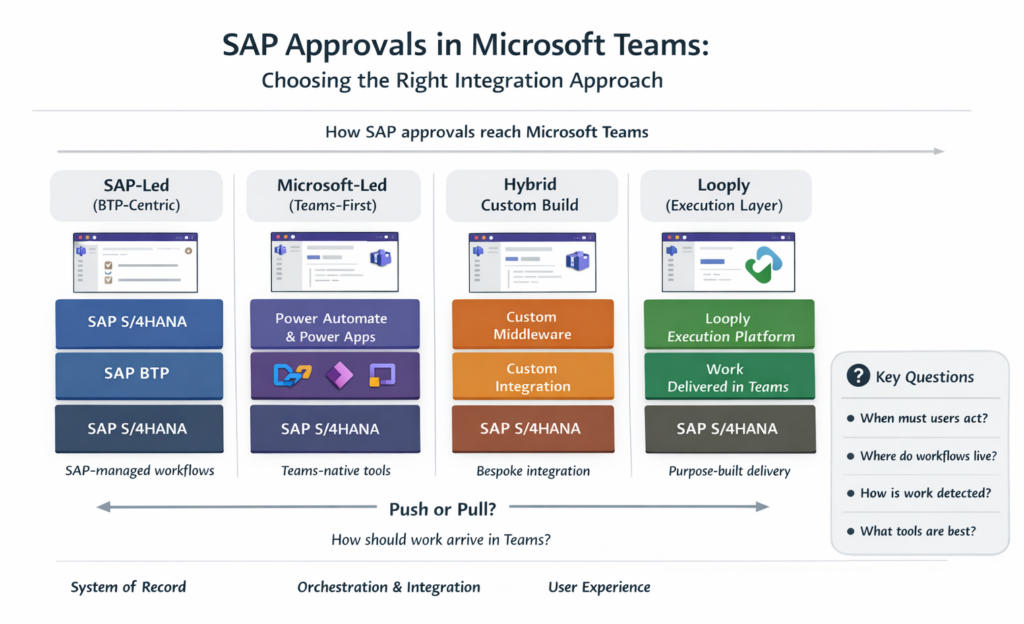
3.1 SAP-led approaches (BTP-centric)
SAP’s primary strategy for extending and orchestrating business processes beyond the S/4HANA core is centred on SAP Business Technology Platform. In this model, SAP positions BTP as the strategic layer for workflow orchestration, integration, and exposure of SAP-driven work to external channels, including Microsoft Teams.
S/4HANA remains the system of record for transactional data and business rules, while BTP acts as the system of orchestration and integration.
Core components
An SAP-led approach typically combines several BTP services, each playing a distinct role in the end-to-end flow.
SAP Build Process Automation is used to model workflows, approval steps, business rules, and forms on BTP. These workflows may be:
In this model, execution remains SAP-managed, with Microsoft Teams acting as a hosted workspace.
- Triggered directly on BTP, or
- Initiated by events or API calls from S/4HANA
In a Teams scenario, the approval logic itself is defined and executed on BTP, even if the business object originates in SAP core.
SAP Task Center provides a unified task list that aggregates workflow tasks from:
- SAP Build Process Automation
- Other SAP workflow sources
- Selected SAP cloud applications
Task Center is often used as the central task abstraction, decoupling task consumption from the originating system.
SAP Build Work Zone acts as the user-facing entry point. When integrated with Microsoft Teams, Work Zone can be surfaced as a Teams app, a tab or embedded workspace.
This allows users to access SAP applications, Task Center task lists, Workflow inboxes and contextual content
Teams, in this case, becomes a container for SAP-managed experiences, rather than the execution surface itself.
How SAP-led integration reaches Microsoft Teams
From a technical perspective, SAP-led integration into Teams follows a layered interaction model:
- Process execution - Workflow logic runs on SAP BTP (for example, in SAP Build Process Automation)
- Task creation - Approval steps generate tasks that are exposed via SAP Task Center
- Workspace exposure - SAP Build Work Zone is configured as an app within Microsoft Teams
- User interaction - Users open the Work Zone app or task list inside Teams to view and act on tasks
In this model:
- SAP retains ownership of workflow state and task lifecycle
- Teams hosts SAP-delivered UI components
- Integration focuses on embedding SAP experiences rather than delivering native Teams interactions
When workflows are initiated by SAP core processes, S/4HANA typically interacts with BTP using: Business events, APIs or Integration Suite flows.
These signals trigger or update workflows on BTP, which then manage task creation and exposure to users through the mechanisms described above.
This approach aligns closely with SAP’s recommended clean core and side-by-side extensibility principles.
3.2 Microsoft-led approaches (Teams-first)
Microsoft-led approaches start from a different premise: Microsoft Teams is the primary execution surface, and enterprise systems such as SAP are accessed from within Teams using Microsoft-native tools and services.
In this model, Microsoft platforms provide the user experience, interaction logic, and often the orchestration layer, while SAP is accessed via APIs or events as an external system.
Core components involved in Microsoft-led Teams integration
A Teams-first approach typically combines several Microsoft services, each addressing a specific concern: user interaction, orchestration, and system connectivity.
Microsoft Power Apps is used to build custom user interfaces that run:
Here, execution is driven by user-initiated interactions in Teams, with SAP accessed on demand.
- As standalone web apps
- Embedded inside Microsoft Teams
- As tabs within Teams channels or chats
In an SAP context, Power Apps are often used to:
- Display SAP data retrieved via APIs
- Provide simplified task or approval screens
- Surface dashboards or summaries relevant to a user
Power Apps focus on presentation and interaction, not workflow ownership.
Microsoft Power Automate provides orchestration and automation logic. In SAP–Teams scenarios, it is commonly used to:
- Call SAP APIs on demand
- Poll SAP systems on a schedule
- React to external triggers
- Route decisions back to SAP
Power Automate flows frequently act as the “glue” between Teams interactions and SAP backend services.
Microsoft Graph is the primary API surface for interacting with Microsoft 365 services, including Teams.
In approval scenarios, Graph is often used to:
- Post messages or notifications to Teams
- Deliver Adaptive Cards into chats or channels
- Capture user responses and route them to downstream logic
Adaptive Cards provide a rich, interactive UI inside Teams, allowing users to take action without leaving the collaboration context.
Microsoft Copilot Studio (formerly Power Virtual Agents) is used to build conversational interfaces that operate inside Teams.
In SAP-related scenarios, these bots typically:
- Answer questions about SAP data
- Retrieve lists of pending items
- Trigger Power Automate flows on request
They excel at conversational discovery and guided interaction.
How Microsoft-led integration reaches SAP
From a technical perspective, Microsoft-led approaches usually follow this interaction pattern:
- User initiates interaction in Teams
This may be opening a Power App, clicking a tab, or chatting with a bot. - Microsoft orchestration executes
Power Automate or custom logic determines what data or action is required. - SAP is queried or updated
SAP is accessed via REST APIs, OData services, Middleware or API gateways. - Results are returned to Teams
Data is displayed in a Power App, returned in a chat response, or shown in an Adaptive Card.
In this model:
- Teams owns the interaction flow
- Microsoft services own orchestration
- SAP acts as a backend system accessed on demand
This approach is pull-based by design. Execution depends on user initiative.
3.3 Hybrid custom builds
Hybrid custom builds sit between SAP-led and Microsoft-led approaches. In this model, organisations design and operate bespoke integration services that connect SAP systems directly to Microsoft Teams using a combination of SAP and Microsoft APIs, middleware, and custom logic.
Rather than adopting a single vendor’s end-to-end platform, the organisation takes responsibility for designing, building, and operating the integration layer itself.
Core components in a hybrid custom build
Hybrid builds vary widely, but they usually include several common building blocks.
SAP integration layer
In this approach, execution logic is fully owned and operated by the organisation.
On the SAP side, hybrid builds typically rely on:
- SAP business events
- OData or REST APIs
- IDocs or RFCs (in legacy scenarios)
Events or API calls are used to signal that a business object has reached a specific state (for example, an approval step), or to retrieve data on demand.
Middleware and orchestration
Between SAP and Teams, organisations commonly introduce:
- Integration middleware (for routing and transformation)
- Custom microservices
- Event brokers or message queues
This layer handles:
- Event subscriptions
- Payload transformation
- Error handling and retries
- Correlation between SAP objects and Teams messages
Microsoft integration layer
On the Microsoft side, integration usually involves:
- Microsoft Graph for interacting with Teams
- Adaptive Cards for approvals and actions
- Azure Functions or custom services to post and process messages
User responses captured in Teams are routed back through the custom integration layer and translated into SAP API calls or events.
How hybrid custom builds reach Microsoft Teams
From a flow perspective, a typical hybrid build looks like this:
- A business event occurs in SAP
For example, an approval step is reached. - The event is published or detected
Via SAP Event Mesh, API calls, or polling logic. - Custom integration logic executes
Middleware or services determine:- Who should be notified
- What data to include
- Which Teams context to use
- A Teams message or card is sent
Using Microsoft Graph and Adaptive Cards. - User action is captured
Responses are posted back to the integration service. - SAP is updated
The decision is written back using SAP APIs.
In this model, all orchestration logic sits outside both SAP and Teams, fully owned by the organisation.
3.4 Looply: a purpose-built execution layer for SAP work in Teams
Looply is designed specifically to deliver SAP-driven work into Microsoft Teams in a way that supports reliable execution, rather than simple visibility or ad-hoc interaction.
Architecturally, Looply sits between SAP systems and Microsoft Teams as a dedicated execution and delivery layer. It does not replace SAP workflow engines or Microsoft collaboration tools. Instead, it focuses on how work is detected, routed, and delivered to users in Teams, while leaving system-of-record responsibilities intact.
Core responsibilities of Looply
Looply is designed around a small number of clearly defined responsibilities:
- Detecting when work is ready to be acted on
In this model, execution is triggered automatically and delivered into Teams, regardless of where process rules live.
- Determining who needs to act
- Delivering actionable notifications into Microsoft Teams
- Capturing user responses and writing outcomes back to source systems
It deliberately avoids owning transactional data or replacing existing SAP business logic.
How Looply connects to SAP systems
Looply can integrate with SAP systems using multiple, complementary patterns. This allows it to operate effectively across modern, constrained, and transitional landscapes.
Event-driven integration
Where SAP processes expose business events or workflow callbacks, Looply can subscribe to these events. Typical triggers include:
- Workflow step reached
- Approval required
- Status change on a business object
Events allow Looply to react immediately when work becomes available.
API-based integration
Looply can interact with SAP systems using APIs to retrieve context for a task, validate user actions and write decisions back to SAP. This approach is commonly used when SAP workflows already exist, when approvals must be recorded in SAP core or when minimal SAP-side changes are desired
Polling-based integration
In scenarios where events or workflow hooks are unavailable, Looply can be configured with scheduled polling jobs.
Polling allows Looply to support restricted systems and external or third-party applications
From the user’s perspective, polling remains invisible. Work still arrives automatically in Teams.
Workflow ownership and routing logic
A defining characteristic of Looply is that it does not impose a single location for workflow rules. Depending on the scenario, workflow logic can live in:
- SAP core - For governed, compliant workflows such as Flexible Workflow or classic workflow
- SAP BTP - For redesigned or cross-system workflows orchestrated on BTP
- Looply itself - For lightweight routing, escalation, or notification logic
Looply consumes outcomes from whichever system owns the workflow and focuses on delivery and response handling.
How Looply delivers work into Microsoft Teams
On the Teams side, Looply uses native Teams interaction patterns, rather than embedded SAP user interfaces.
This includes adaptive Cards in chats or channels, actionable notifications and contextual task messages.
User responses are captured by Looply and routed back to the appropriate system of record.
4. Defining the real business requirement: how work should reach users in Teams
The most important design question is behavioural:
When work is ready, should the user have to look for it — or should the system notify them automatically?
Throughout this article, “push” and “pull” refer to the user experience — not whether systems use events or polling internally.
Push vs pull from the user’s perspective
- Pull-based models rely on user initiative. They are suitable for exploration, reporting, and non-urgent tasks.
- Push-based models notify users automatically and enable immediate action. They are essential for approvals and time-sensitive decisions.
From a business perspective, only push-based delivery produces predictable cycle times.
Push experience vs integration technique
Push is about user experience, not how the system detects work. In real landscapes:
- Not all processes expose events
- Some systems cannot be enhanced
- Legacy systems still matter
Polling is sometimes unavoidable. As long as polling happens inside the integration layer and the user is still notified automatically in Teams, the experience remains push-based.
Workflow ownership should remain a choice
Workflow rules can legitimately live in:
- SAP core (governance and compliance)
- SAP BTP (redesigned processes)
- External orchestration layers (lightweight coordination)
Forcing workflow relocation purely to improve user experience introduces unnecessary risk.
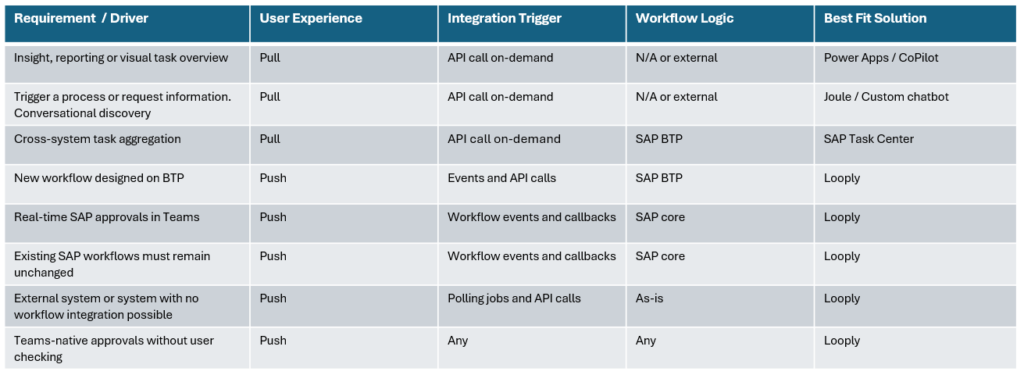
5. The decision framework: matching requirements to solutions
This table brings the discussion together by mapping business requirements to the most appropriate solution approach.
Solution selection matrix
6. A practical way to choose
After reviewing the available approaches and mapping them to different requirements, a consistent pattern emerges: the right integration approach is determined less by technology and more by behaviour.
This section provides a simple, practical way to choose an approach without needing to start from platform preferences or vendor recommendations.
Start with execution, not tooling
The most important question is:
Does this work need to be acted on promptly and reliably, or is it primarily informational?
If the task is informational — for example, checking status, viewing summaries, or exploring data — pull-based approaches work well. Dashboards, chatbots, and AI assistants are effective because the user chooses when to engage.
If the task is executable — approvals, confirmations, acknowledgements — then the cost of delay matters. In these cases, relying on users to remember to check for work introduces risk and inconsistency.
Execution-focused work requires a push-based experience.
Decide where workflow ownership belongs
The next question is about control:
Where should the rules that govern this work live?
There are three valid answers:
- In SAP core, where governance and auditability are critical
- On SAP BTP, where processes are being redesigned or extended
- In an external orchestration layer, where lightweight routing or coordination is sufficient
A common mistake is to let the integration approach dictate where workflows live. In practice, workflow ownership should be determined by business and governance needs, not by how work is delivered to users.
Any approach that forces workflow relocation purely to reach Microsoft Teams introduces unnecessary change.
Be realistic about system constraints
A third question often decides the architecture:
Can the source system reliably signal when work is ready?
In ideal scenarios, business events or workflow callbacks are available. In many real environments:
- Events are incomplete or unavailable
- Systems cannot be enhanced
- Legacy processes still exist
Polling is sometimes unavoidable. This should not be treated as a failure or compromise. What matters is where polling occurs.
If systems are polled centrally and users are still notified automatically in Teams, the user experience remains push-based and reliable.
Align the approach to the user’s working reality
Another useful test is behavioural:
If the user does nothing, will the work still reach them?
If the answer is “no”, the approach depends on user discipline. This is acceptable for insight and exploration, but risky for approvals and time-bound decisions.
If the answer is “yes”, the approach supports execution regardless of how busy the user is.
A concise selection guide
Bringing these questions together, a practical selection guide looks like this:
- If users must act quickly → push-based delivery
- If workflows already exist and work well → do not rebuild them
- If Teams is where users spend their day → Teams-native interaction
- If systems are constrained → polling-capable integration
- If insight is the goal → pull-based tools are sufficient
This framing allows organisations to choose an approach that fits the work, rather than forcing the work to fit a platform.
7. How these approaches coexist in a real architecture
Once an organisation has selected the right approach for different types of work, the next concern is usually architectural:
“How does this fit with everything else we already have?”
In practice, SAP–Teams integration works best when multiple approaches coexist, each applied deliberately to the type of work it is best suited for.
Coexistence is the norm, not the exception
Modern enterprise landscapes are rarely uniform. It is entirely normal for an organisation to have:
- Long-running, governed workflows in SAP core
- New or redesigned processes on SAP BTP
- Dashboards and insights delivered through Teams
- Conversational access via AI assistants
- Execution-critical approvals that must reach users immediately
Trying to force all of these requirements into a single integration pattern usually leads to compromise. A more sustainable approach is to align each requirement with the most appropriate mechanism, while allowing them to operate together.
Distinct roles within the architecture
A useful way to think about coexistence is to assign clear roles to each category of tool.
SAP systems: system of record
SAP systems continue to:
- Own transactional data
- Enforce business rules and authorisations
- Maintain audit trails and compliance
Whether workflows run in SAP core or on SAP Business Technology Platform, SAP remains the authoritative source of truth.
Microsoft Teams: system of engagement
Microsoft Teams provides:
- A consistent collaboration surface
- Notifications, conversations, and context
- The place where users prioritise and act
Teams should not be expected to replace SAP governance. Its role is to surface work and enable action, not to redefine process ownership.
AI and discovery tools: insight and guidance
AI-driven tools such as Microsoft Copilot and SAP Joule play an increasingly important role, but a specific one.
They are best used for:
- Explaining context
- Summarising information
- Answering questions
- Helping users understand what is happening
They complement execution flows, but they do not replace them. AI reduces friction once engagement starts; it does not guarantee that engagement occurs.
Execution layers: ensuring work gets done
Execution-focused integration layers such as Looply exist to solve a very specific problem:
- Detect when work is ready
- Deliver it automatically to the right user in Teams
- Capture the outcome reliably
- Write the result back to the system of record
This role is distinct from analytics, discovery, or orchestration. It is about timing, reliability, and completion.
A layered, cooperative model
In a mature architecture, these components work together:
- SAP core and SAP BTP define what needs to happen
- Execution layers ensure when it reaches users
- Teams provides where work is acted on
- AI tools support how users understand and complete tasks
None of these invalidate the others. In fact, they are strongest when combined intentionally.
Where Looply fits
Looply exists to solve a specific execution problem:
- SAP work must reach users in Teams
- Users should not have to go looking
- Workflow ownership must remain flexible
- Integration must work even in imperfect landscapes
By decoupling detection from delivery, Looply improves execution today without constraining tomorrow’s architecture.
Avoiding false choices
A common anti-pattern is framing decisions as:
- SAP or Microsoft
- BTP or Teams
- AI or workflow
In reality, the more useful distinction is:
- Execution vs insight
- Push vs pull
- System responsibility vs user experience
Once those lines are clear, coexistence becomes straightforward.
Why this matters to decision-makers
This coexistence model reassures stakeholders that:
- Choosing a push-based execution model does not conflict with SAP’s clean-core strategy
- Leveraging Teams does not weaken SAP governance
- Introducing a purpose-built execution layer does not block future BTP or AI initiatives
- Incremental improvements can be made without wholesale redesign
Most importantly, it allows organisations to solve today’s execution problems while remaining aligned with long-term platform strategies.
Summary: choosing the right approach starts with how work gets done
Integrating SAP with Microsoft Teams is no longer a question of whether it can be done, but how it should be done to deliver real business value.
This article has shown that there is no single “best” integration approach. Instead, there are multiple valid patterns, each optimised for a different type of requirement:
- SAP-led approaches prioritise governance, standardisation, and BTP-centric process design
- Microsoft-led approaches prioritise user experience, exploration, and rapid interaction
- Hybrid custom builds prioritise flexibility and control, at the cost of ownership
- Purpose-built execution layers focus on ensuring work is completed reliably in Teams
The critical mistake organisations make is choosing between these approaches based on platform strategy alone.
The more useful question is behavioural:
When work is ready, should users have to go looking for it — or should it arrive automatically where they already work?
Once that question is answered, the architecture becomes much clearer.
The core distinctions to remember
Several distinctions cut through most SAP–Teams integration debates:
- Execution vs insight
Dashboards, chatbots, and AI assistants are excellent for insight. Approvals and confirmations require execution. - Push vs pull
Pull-based approaches depend on user initiative. Push-based approaches ensure predictable outcomes. - Workflow ownership vs delivery
Workflow rules should live where governance and business logic make sense — not where integration is easiest. - Detection vs experience
Polling, APIs, and events are technical mechanisms. What users experience is either push or pull.
Keeping these distinctions clear prevents over-engineering and unnecessary redesign.
A pragmatic architectural outcome
In practice, the strongest enterprise architectures do not attempt to force all work into a single pattern. Instead, they combine approaches deliberately:
- SAP remains the system of record
- Teams remains the system of engagement
- AI tools support discovery and understanding
- Execution layers ensure work is acted on at the right moment
This layered model allows organisations to improve execution today while staying aligned with long-term SAP and Microsoft strategies.
Final thought
The success of SAP–Teams integration is ultimately measured not by how elegantly systems are connected, but by how reliably work gets done.
Starting with that outcome — rather than a predefined platform choice — is what separates integrations that look good on paper from those that deliver sustained productivity gains in the real world.