


Stelo for SuccessFactors
Stelo for SuccessFactors: Designing the Right Integration Architecture
Stelo enables organizations to digitize manual processes, bringing those processes into SAP ECC or SAP S/4HANA. Many such processes are HR-related, or rely on some HR information for approval workflows.
As SAP customers have adopted SAP SuccessFactors, then, it becomes necessary for Fiori forms processes in Stelo to integrate with SuccessFactors to read data, or make updates to employees or organizational objects.
For the extension of SuccessFactors processes, you would naturally look to extend the product, but where the process naturally sits outside SuccessFactors, but needs integration to SuccessFactors data, then Stelo remains a good fit.
The question emerges of where the integration with SuccessFactors should actually fit.
At first glance the answer may seem straightforward. SuccessFactors exposes APIs, so the application simply calls them. In practice, however, there are several places where that integration logic could reside, and each option has implications for governance, maintainability, and system design.
The most effective architectures typically do not place all integration logic in one location. Instead, they distribute responsibilities across the landscape in a way that preserves process control, clarity, and long-term maintainability.
Four Possible Integration Points
When building Stelo-based processes that rely on SuccessFactors data, there are four main places where the integration logic could live.
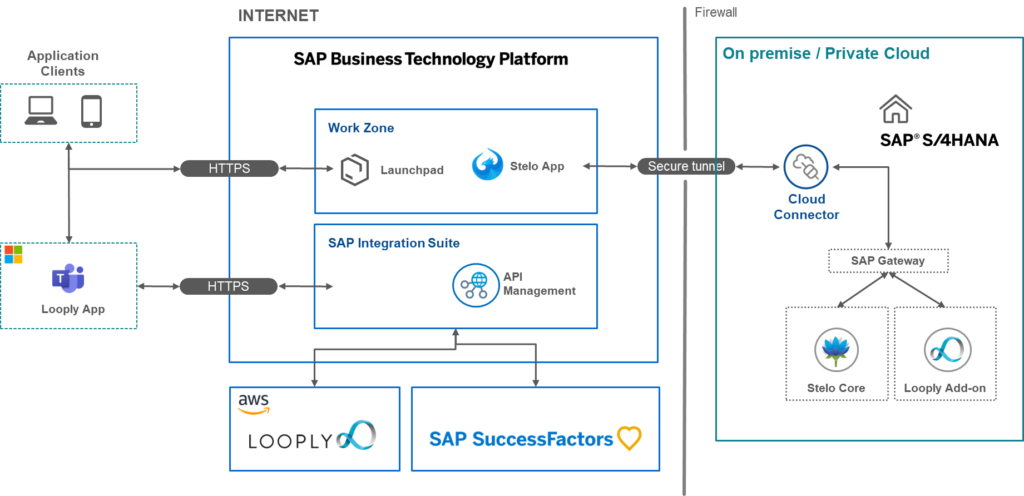
The first option is inside the S/4HANA backend, where ABAP service classes, exits, or helper functions call SuccessFactors APIs. In this model, the Stelo app communicates only with S/4HANA, and the backend system handles all external integration.
The second option is direct integration from the Fiori application. In this case the Stelo UI itself calls SuccessFactors APIs for certain operations.
A third approach introduces SAP BTP Integration Suite as an intermediary, allowing applications or backend systems to call a managed API layer that handles authentication, payload transformation, and connectivity to SuccessFactors.
Finally, there is the possibility of placing some integration logic in Looply when approval workflows are executed through Microsoft Teams.
Each of these approaches has a valid role, but they serve different architectural purposes.
The Core Architectural Principle
The most important design principle when integrating Stelo processes with SuccessFactors is simple: Keep authoritative process control in one place.
When Stelo is used to digitise processes into S/4HANA, that place should normally be the backend application layer.
Business rules, validation logic, routing decisions, and posting behaviour should remain inside S/4HANA rather than being distributed across multiple components. This approach ensures that the process behaves consistently regardless of how users interact with the application.
In contrast, distributing core logic across UI code, workflow tools, and integration layers can lead to fragmented implementations that are difficult to govern and maintain.
Where Should SuccessFactors Integration Logic Sit?
When designing a Stelo process, the different integration options can be compared as follows.
Integration Location | Typical Use Cases | Advantages | Risks / Limitations | Recommended Role |
S/4HANA Backend | Data validation, routing logic, approval determination, transactional updates to SuccessFactors | Centralised process control, strong governance, consistent audit trail, easier testing and error handling | Requires handling authentication and connectivity to SuccessFactors APIs | Primary location for business logic and process control |
Stelo / Fiori Application | Value helps, employee search, type-ahead lookups, optional UI enrichment | Fast response times, improved user experience | Risk of duplicating business rules and fragmenting logic | Limited use for lightweight read-only scenarios |
SAP BTP Integration Suite | API mediation, authentication handling, payload transformation | Simplifies cloud authentication and creates reusable integration services | Adds another architectural component to manage | Recommended enterprise integration layer |
Looply | Approval orchestration, Teams notifications, collaboration workflows | Enables approvals directly within Microsoft Teams | Risk of moving core process logic outside the ERP process engine | Best used for collaboration and approval interaction |
Backend-Centric Integration
The most robust architecture for Stelo-led HR processes is therefore a backend-centric integration model.
In this approach, the Stelo application communicates only with S/4HANA services. The backend system performs the necessary API calls to SuccessFactors to retrieve employee data, validate organisational information, determine approval hierarchies, or post updates.
This model centralises business logic and ensures that all decisions affecting the process are governed within a single application layer. It also provides a single location for logging, monitoring, retry behaviour, and security controls.
However, directly calling cloud APIs from S/4HANA introduces complexity. Authentication mechanisms such as OAuth and SAML bearer assertions must be managed, and connectivity between on-premise systems and cloud services must be configured securely.
This is where SAP BTP Integration Suite becomes valuable.
The Role of SAP BTP Integration Suite
SAP BTP Integration Suite can act as a mediating integration layer between enterprise systems and SaaS platforms such as SuccessFactors.
Instead of S/4HANA communicating directly with SuccessFactors, the backend system can call a managed API endpoint exposed through Integration Suite. BTP then handles authentication, protocol mediation, payload transformation, monitoring, and retries.
This architecture offers several advantages. It shields S/4HANA from cloud-specific authentication models, allows integration logic to be reused across multiple applications, and provides centralised monitoring and governance.
For organisations adopting SAP BTP as their strategic integration platform, this approach often provides the most maintainable long-term architecture.
When Direct UI Integration Makes Sense
There are still cases where direct integration from the Stelo application to SuccessFactors can be useful.
These scenarios typically involve lightweight read operations that enhance the user experience. Examples include searchable employee lookups, dynamic value helps, or optional contextual data displayed in the interface.
Because these operations are read-only and non-authoritative, they do not compromise the integrity of the underlying process. However, once validation, routing, or posting logic begins to depend on UI-based integration, governance quickly becomes more difficult.
For this reason, direct UI integration should remain a tactical choice rather than the core architecture.
Looply and Microsoft Teams Approvals
Another dimension appears when approvals are executed through Microsoft Teams.
With Looply, approval workflows can be delivered through adaptive cards inside Teams, allowing users to approve, reject, or interact with business processes without opening SAP applications.
In the simplest architecture, S/4HANA remains the master of the process. Stelo initiates the workflow, S/4HANA determines the approval context, and Looply provides the collaboration channel where the approval takes place.
In some cases, Looply may also perform certain integration tasks itself, such as retrieving organisational information from SuccessFactors to determine approvers dynamically.
However, core business rules should generally remain inside the process engine rather than being distributed across collaboration platforms.
Where Each Responsibility Should Live
A useful way to think about the architecture is to assign clear responsibilities to each layer of the system landscape.
Responsibility | Best Place | Why |
Form rendering and user interaction | Stelo / Fiori app | This is the natural location for user experience, form layout and guided interaction. |
Lightweight search helps and lookups | Stelo / Fiori app | Direct read-only calls improve responsiveness for user assistance. |
Authoritative pre-population of data | S/4HANA backend | Ensures data used in the process is controlled and auditable. |
Business rule validation | S/4HANA backend | Prevents rules being bypassed by UI changes or alternative entry points. |
Routing logic and approver determination | Usually S/4HANA backend | Routing depends on master data and business rules that belong with the process. |
Collaboration-driven approval logic | Looply (in selected cases) | Useful where approval behaviour is collaboration-oriented or reused across Teams workflows. |
Transactional posting and process updates | S/4HANA backend | Posting logic must remain within the authoritative process engine. |
SuccessFactors authentication | SAP BTP Integration Suite | BTP can manage OAuth, token exchange and connectivity. |
Payload mapping and API mediation | SAP BTP Integration Suite | Enables reusable integration services. |
Monitoring and retry behaviour | SAP BTP Integration Suite | Best handled in the integration layer rather than application code. |
Teams approvals and notifications | Looply | Provides adaptive cards and collaboration workflows. |
Event-driven follow-on processes | BTP or Looply | Suitable for asynchronous processing triggered by SuccessFactors events. |
A Practical Architecture for Stelo and SuccessFactors
In practice, the strongest architecture for Stelo processes combines these elements rather than relying on a single integration approach.
The Stelo application handles the user experience, while S/4HANA remains the authoritative process engine responsible for validation, routing and transactional updates.
SAP BTP Integration Suite can mediate interactions with SuccessFactors, simplifying authentication and enabling reusable integration services.
Looply provides the collaboration layer for approvals delivered through Microsoft Teams.
When each component plays a clearly defined role, the overall solution becomes easier to govern, explain and extend. The key is not simply connecting systems, but designing the architecture in a way that preserves clarity and control.