




Invoice Exceptions: The Hidden Drag on Accounts Payable Performance
Invoice Exceptions: The Hidden Drag on Accounts Payable Performance
Bring approvals into Teams to accelerate and take control of the process

Accounts payable teams have made huge progress in recent years. Supplier invoices are no longer simply paper documents arriving in the post, being passed between desks, and eventually keyed into finance systems. In many SAP organisations, invoice capture, validation, posting and workflow are now highly structured processes.
But one familiar problem remains.
Supplier invoices still get stuck when someone outside the AP team needs to make a decision.
It might be a delivery charge that was not included on the original purchase order. It might be a price difference, a missing goods receipt, a service charge that needs business confirmation, or a question over whether the work was actually completed. The invoice may be in SAP. The workflow may be controlled. The document may be attached. But if the approval depends on a busy manager logging into SAP, finding the right task, reviewing the invoice, understanding the issue and taking action, the process can still slow down.
This is one of the hidden drags on AP performance. The process is digital, but the decision point is still inconvenient.
AP automation often stalls at the human approval step
Many finance teams focus on automating the parts of invoice processing that sit inside the AP function. That makes sense. Invoice capture, data extraction, validation, matching and posting are all important areas for improvement.
However, a significant amount of AP delay happens outside the AP team.
When an invoice matches perfectly, the process can often continue with little or no intervention. But when there is an exception, the process needs someone to make a judgement. That person may be a budget holder, a cost centre manager, a requisitioner, a goods recipient, a project manager or a department head.
These users are not necessarily working in SAP all day. They may rarely log into SAP at all. Their day may revolve around Microsoft Teams, meetings, email, documents, operational issues and management decisions. From their perspective, an invoice approval is one of many tasks competing for attention.
That is where delays begin.
The AP team may have done everything correctly. The invoice may be visible in SAP. The workflow may have been routed to the right person. But if the approver does not see the request, does not understand the context, or puts off logging into SAP until later, the invoice remains blocked.
The problem is not just speed
It is tempting to think of invoice approval delays purely as a speed issue. Faster approvals are certainly important, but the problem is broader than that.
Slow invoice approvals can affect supplier relationships. They can delay payment runs. They can create avoidable queries from suppliers. They can increase the amount of manual chasing carried out by the AP team. They can also make it harder for finance to maintain accurate visibility of liabilities and cash requirements.
There is also a control issue.
When managers find the approval process inconvenient, they may respond informally by email, in a Teams chat, or through a quick verbal confirmation. That may help AP move the process forward in the short term, but it weakens the structure of the process. Decisions can become detached from the SAP workflow. Supporting evidence may be hard to find later. The audit trail may be less complete than it should be.
The goal should not be to bypass SAP controls. The goal should be to make the controlled process easier for the approver to complete.
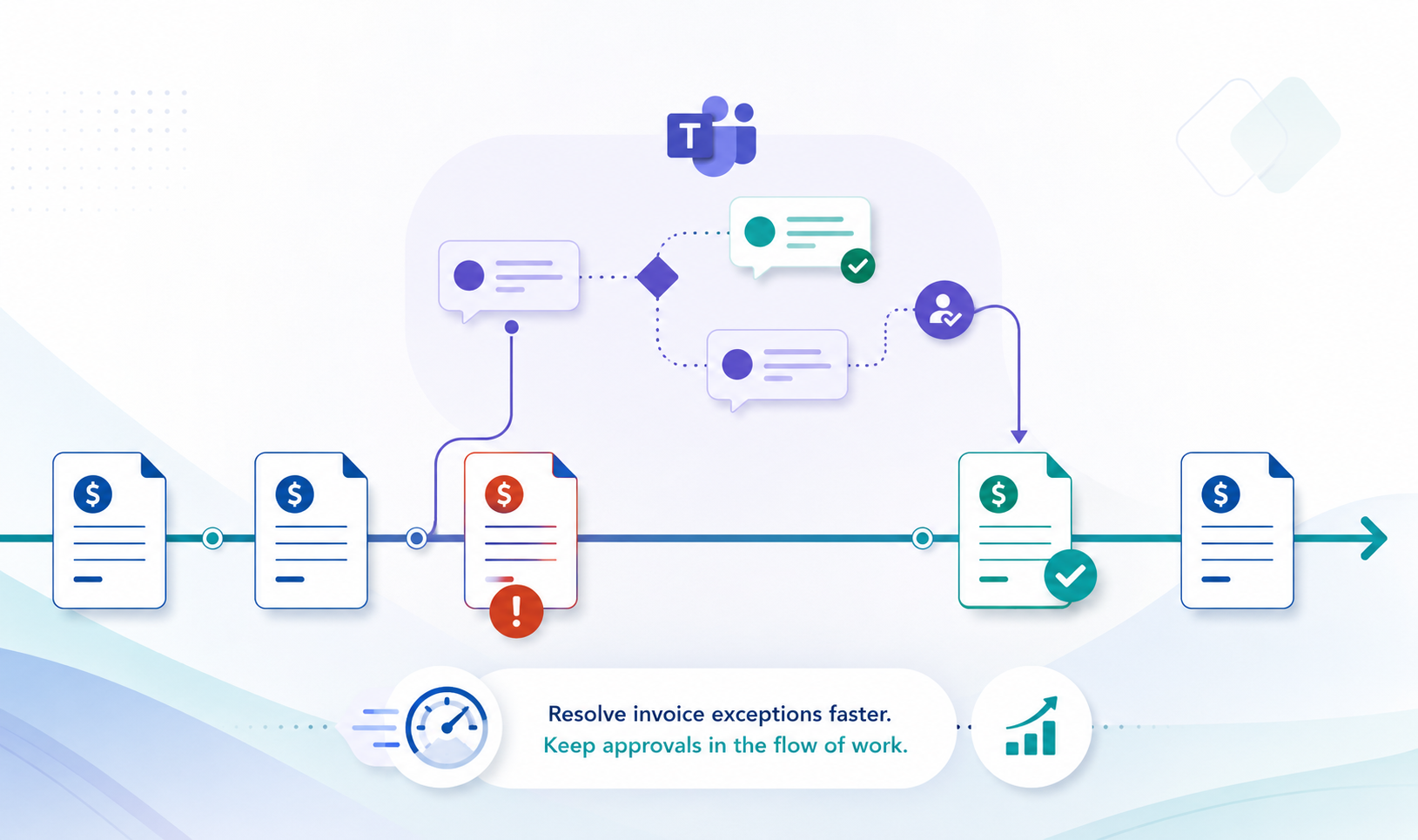
Why invoice exceptions need better context
Invoice exceptions are not always complicated, but they often require context.
A manager may need to know which supplier submitted the invoice, what the invoice relates to, which purchase order or cost object is involved, what amount is being approved, and why the invoice requires attention. If there is a difference between the invoice and the purchase order, the approver needs to understand the difference quickly.
The original invoice document may also matter. For example, if the supplier has added delivery charges that were not included on the purchase order, the approver may need to review the invoice itself before deciding whether the charge is legitimate.
This is where traditional approval notifications often fall short.
A simple email saying that an invoice is awaiting approval does not provide enough context. The approver then has to open SAP, navigate to the relevant task, find the invoice details, locate the attached document and decide what to do. Each step adds friction. Each step increases the chance that the task will be deferred.
A better approach is to bring the decision to the approver, with the right context included.
Supplier invoice approvals in Microsoft Teams
Looply enables SAP business processes to be extended into Microsoft Teams, so that managers can complete approvals where they are already working.
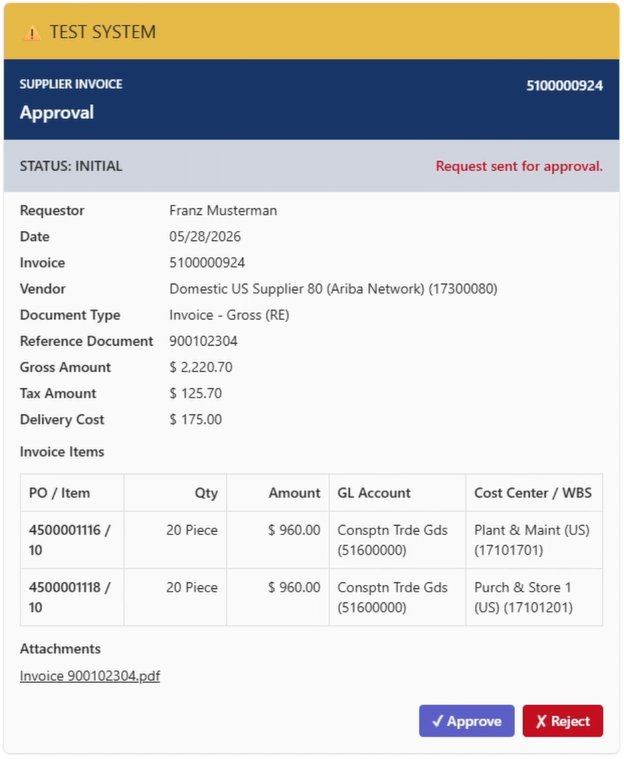
In our latest demo, we show a supplier invoice approval process running through Teams. The invoice has been uploaded into SAP and stored as an attachment. The approver receives an Adaptive Card in Microsoft Teams with the key invoice information and the available actions.
The manager can review the details, open the original invoice document from the Teams card, and then approve or reject the invoice without needing to log into SAP.
In this example, the invoice includes delivery charges that were not on the original purchase order. That is a common type of exception. It is not necessarily a problem, but it does require someone with business knowledge to confirm whether the additional charge is acceptable.
By presenting the approval in Teams, Looply reduces the effort required from the manager. The task is visible. The context is clear. The invoice document is accessible. The approval action is immediate. SAP remains the system of record, but the user experience is far simpler.
Keeping SAP as the system of record
One important point is that this approach does not replace SAP. It extends the SAP process into Teams.
The supplier invoice remains in SAP. The attachment remains in SAP. The approval outcome is returned to SAP. The business process continues to follow the rules, controls and authorisations defined for the organisation.
Teams becomes the place where the approver interacts with the task, not a replacement for the finance system.
That distinction matters. Finance teams do not want uncontrolled approvals happening in side channels. They do not want decisions detached from SAP. They do not want to sacrifice governance for convenience.
Looply helps resolve that tension. It gives approvers a more convenient way to act, while keeping the underlying process controlled.
Reducing the burden on AP teams
AP teams spend a great deal of time managing exceptions. Some of that work is unavoidable. Invoices need to be checked. Differences need to be investigated. Business users need to confirm whether charges are valid.
But too much AP time is lost to chasing.
Has the manager seen the request? Do they understand what they need to do? Have they logged into SAP? Do they know where to find the attachment? Are they waiting until later? Has the email disappeared into a crowded inbox?
Every follow-up takes time. Every delayed approval increases uncertainty. Every manual reminder adds work that should not be necessary.
By moving the approval into Teams, AP teams can reduce the amount of chasing required. The request appears in a familiar work environment. The approver can act from any device. The task is presented in a structured format. The decision is captured in the right system.
This does not eliminate every exception, but it makes the exception process easier to manage.
A better experience for managers
Managers are often asked to approve finance transactions even though finance systems are not part of their daily work. They may be responsible for budgets, projects, departments or operational teams, but that does not mean they are regular SAP users.
For these users, the approval experience matters.
If the process is difficult, approvals are delayed. If the request lacks context, decisions are postponed. If the user has to log into SAP just to review a document and approve a small difference, the task is likely to be pushed down the priority list.
A Teams-based approval experience changes that.
The manager receives the request in the same environment they use for communication and collaboration. The key details are presented clearly. The original invoice can be opened directly. The action can be completed immediately.
That makes the controlled route the easiest route.
Why this matters for finance transformation
Finance transformation is often discussed in terms of automation, analytics, shared services, standardisation and process efficiency. Those are all important. But finance transformation also depends on how effectively finance processes interact with the wider business.
Supplier invoice approvals are a good example. AP can only automate so much if the process still depends on business users responding to exceptions. The more friction those users experience, the more the process slows down.
This is why the user experience around approvals matters. It is not just a convenience issue. It directly affects process performance.
When invoice approvals are embedded into Teams, organisations can improve responsiveness without weakening control. They can reduce delays without asking every manager to become a heavy SAP user. They can keep SAP as the system of record while making the approval process fit the way people actually work.
From email notification to actionable process
Many SAP processes still rely heavily on email notifications. Email is useful for general communication, but it is not always the best channel for actionable business tasks.
An email can be missed, forwarded, misunderstood or left unread. It may not contain all the information needed to make a decision. It may not provide a structured way to act. It can easily become separated from the business process it is supposed to support.
A Teams Adaptive Card is different. It can present the task, the context, the supporting information and the available actions together. It gives the approver a clearer decision point. It also helps ensure that the response goes back into the process rather than being lost in a separate conversation.
For supplier invoice approvals, that difference is significant. The approver does not simply receive a notification. They receive an actionable task.
Practical examples of invoice approval use cases
The same approach can support a range of invoice approval and exception scenarios.
An invoice may include unplanned delivery charges that need to be accepted by the business. A service invoice may require confirmation that the work was completed. A price difference may need approval from a budget holder. An invoice without a purchase order may need coding and authorisation. A blocked invoice may need clarification from the requester or goods recipient.
In each case, the business problem is similar. The AP team needs input from someone outside AP, and that person needs enough context to respond quickly and accurately.
Looply makes that interaction simpler by bringing the request into Teams.
Conclusion
Supplier invoice processing does not only depend on what happens inside AP. It also depends on how quickly and confidently business users respond when their input is needed.
That is why invoice exceptions can become such a drag on AP performance. The process may be digital, but the decision still depends on a person. If that person has to find an email, log into SAP, navigate to a task and locate the supporting document, delays are almost inevitable.
By using Looply to bring supplier invoice approvals into Microsoft Teams, organisations can make the approval process faster, clearer and easier for managers, while keeping SAP at the centre of the process.
The invoice remains in SAP. The document remains controlled. The approval is returned to the SAP process. But the manager can review and act in Teams, where they are already working.
For AP teams, that means less chasing and faster resolution of exceptions. For managers, it means a simpler approval experience. For finance leaders, it means a practical way to improve process performance without compromising control.